Free Prompt Library
100 Drone Shot AI Video Prompts
Aerial, reveal, orbit, and fly-through prompts for cinematic drone-style shots in Kling AI, Runway, and Sora. Written by a VFX professional.
100
Prompts
5
Shot Types
100%
Free
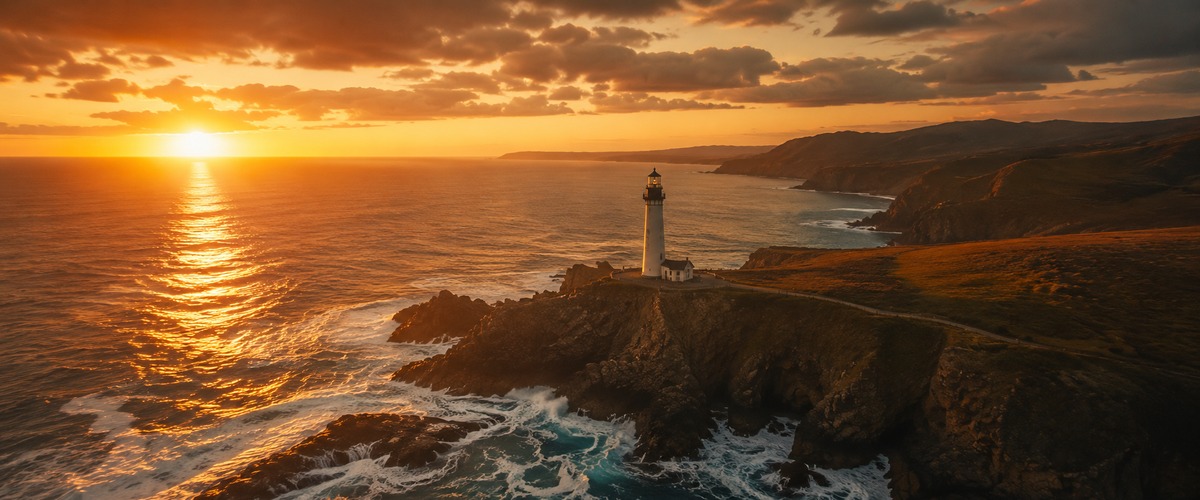
#001 · Reveal
Drone rising slowly from behind a mountain ridge, the camera ascending until it clears the peak and reveals a vast valley below with a river snaking through it, forests on either side, a small village visible in the distance, golden hour light flooding the newly revealed landscape, epic slow reveal.
✦ Why this works
- Rising shot withholds the full picture then gives it — the ascent IS the storytelling, every metre adding weight
- Golden hour rakes light at the lowest possible angle — every edge glows, every surface separates, everything looks significant
- The rising shot creates progressive revelation — the subject grows and the context fills in simultaneously
▶ Best for
- A hiking or mountaineering documentary's most dramatically timed aerial reveal
- An adventure film establishing the destination — withheld then given in a single ascending motion
- A landscape film establishing that some views require effort to earn and the earning is the story
#002 · Reveal
Low drone flying forward through morning mist over a lake, the fog parting as the drone advances to reveal a temple complex on the far shore reflected perfectly in the still water, the revelation unfolding gradually as the mist clears, dawn light, meditative and grand.
✦ Why this works
- Aerial altitude reveals full scale and pattern that ground-level photography can never communicate
- Dawn light codes beginning into the frame — the warmth arriving from darkness carries the emotional weight of hope
- The drone movement type communicates the specific relationship between camera and subject — approach, encirclement or passage
▶ Best for
- A highland travel documentary's most atmospherically specific morning lake sequence
- A meditation film's visual entry into a world of perfect natural calm
- A fantasy film's establishing shot for a world between the mundane and the mythological
#003 · Reveal
Drone ascending straight up from ground level in a forest, the canopy approaching and then breaking through into open sky, revealing the full extent of the forest from above, the tops of the trees stretching to the horizon, a satisfying emergence into light.
✦ Why this works
- Rising shot withholds the full picture then gives it — the ascent IS the storytelling, every metre adding weight
- The light quality and direction encode the emotional register before a single narrative element is consciously read
- The rising shot creates progressive revelation — the subject grows and the context fills in simultaneously
▶ Best for
- A nature documentary establishing the forest as a layered ecosystem from floor to canopy
- A travel film's most original forest sequence — the view that no human naturally occupies
- A fantasy film using the forest ascent as a visual metaphor for crossing between two worlds
#004 · Reveal
Drone flying backward over a city rooftop revealing the skyline behind it, the city expanding into frame as the drone retreats, skyscrapers on either side, sunset behind the retreating buildings painting the sky orange and pink, the scale of the city growing.
✦ Why this works
- Pull-back reveal exposes context the viewer didn't know existed — the subject suddenly belongs to a larger world
- Dusk light encodes ending — the colour temperature of last light makes loss and completion legible without a word
- The drone movement type communicates the specific relationship between camera and subject — approach, encirclement or passage
▶ Best for
- An urban documentary's most dramatically composed city skyline reveal
- A city film's signature shot — the metropolis revealed in one reverse motion
- A feature film's most effective city establishing shot — the skyline as the story's world
#005 · Reveal
Drone rising from ocean surface level, water droplets on the lens, ascending to reveal a small island from above, the reef visible through the clear water around it, the island growing smaller as the drone rises to show the vast ocean surrounding it.
✦ Why this works
- Rising shot withholds the full picture then gives it — the ascent IS the storytelling, every metre adding weight
- Water droplets on the lens make the camera a physical participant — the environment touching the optic itself
- The rising shot creates progressive revelation — the subject grows and the context fills in simultaneously
▶ Best for
- A maritime documentary's most physically immersive surface-level reveal
- A film where the camera itself transitions between two worlds in one ascending motion
- An ocean documentary's most viscerally present establishing shot — surfacing with the subject
#006 · Reveal
Drone cresting a sand dune in slow forward motion, the barren desert visible on this side giving way to reveal a hidden oasis on the other side — palm trees, water, green in the middle of the arid landscape, the reveal slow and earned.
✦ Why this works
- Aerial altitude reveals full scale and pattern that ground-level photography can never communicate
- The light quality and direction encode the emotional register before a single narrative element is consciously read
- The drone movement type communicates the specific relationship between camera and subject — approach, encirclement or passage
▶ Best for
- A desert travel documentary's most graphically composed sand and sky reveal
- A Saharan film's most iconic dune-crest establishing image
- A sci-fi film using real desert footage as a convincing alien planet surface transition
#007 · Reveal
Drone ascending from a tight urban alley, building walls on both sides, rising until it clears the rooftops to reveal the entire city spread in every direction, the intimate becoming epic in a single vertical movement.
✦ Why this works
- Rising shot withholds the full picture then gives it — the ascent IS the storytelling, every metre adding weight
- The light quality and direction encode the emotional register before a single narrative element is consciously read
- The rising shot creates progressive revelation — the subject grows and the context fills in simultaneously
▶ Best for
- An urban documentary's most architecturally specific vertical reveal — the city seen as a canyon
- A city film establishing the compressed verticality of dense urban space
- A thriller establishing a city by first showing its narrowness before its full scale
#008 · Reveal
Drone flying forward at low level through a wheat field, the golden stalks filling the frame, then the field ending abruptly at a cliff edge to reveal an ocean below, the transition from enclosed warmth to vast open sea, dramatic and unexpected.
✦ Why this works
- Aerial altitude reveals full scale and pattern that ground-level photography can never communicate
- The light quality and direction encode the emotional register before a single narrative element is consciously read
- The drone movement type communicates the specific relationship between camera and subject — approach, encirclement or passage
▶ Best for
- An agricultural documentary's most immersive field-level cereal crop sequence
- A food documentary establishing the wheat field as a landscape experienced from within
- A seasonal film establishing the summer wheat field as the most golden of all landscapes
#009 · Reveal
Drone rotating 180 degrees from facing a canyon wall to revealing the canyon itself — the depth and scale of the gorge suddenly visible, the river far below, the opposite wall miles away, the reveal happening in a slow steady pivot.
✦ Why this works
- Aerial altitude reveals full scale and pattern that ground-level photography can never communicate
- The light quality and direction encode the emotional register before a single narrative element is consciously read
- The drone movement type communicates the specific relationship between camera and subject — approach, encirclement or passage
▶ Best for
- A documentary or cinematic reveal sequence where the subject's full scale is the story
- An aerial establishing shot that rewards patience — the approach before the discovery
- A travel or adventure film's most memorable and scale-communicating location reveal
#010 · Reveal
Drone ascending through fog at dawn, visibility zero, then breaking through the cloud ceiling to reveal mountain peaks rising above the clouds, an island archipelago in the sky, warm sunrise light above, cold grey below, otherworldly reveal.
✦ Why this works
- Rising shot withholds the full picture then gives it — the ascent IS the storytelling, every metre adding weight
- Dawn light codes beginning into the frame — the warmth arriving from darkness carries the emotional weight of hope
- The rising shot creates progressive revelation — the subject grows and the context fills in simultaneously
▶ Best for
- A weather documentary's most dramatically experiential cloud ceiling breakthrough
- A film establishing the transition from fog to clarity as a complete visual event
- A travel documentary's most atmospherically transformative aerial moment — zero visibility to infinite
#011 · Reveal
Drone flying backward from a close-up of a waterfall, pulling back to reveal the full height of the falls, then continuing back to show the river leading to it, then the landscape around it, the scale building with each second of retreat.
✦ Why this works
- Pull-back reveal exposes context the viewer didn't know existed — the subject suddenly belongs to a larger world
- The light quality and direction encode the emotional register before a single narrative element is consciously read
- The pull-back creates the discovery of context — the small thing revealed to be part of something vast
▶ Best for
- A nature documentary's most scale-revealing waterfall pull-back sequence
- A travel film establishing a waterfall's true height from the only perspective that shows it fully
- A fantasy film establishing a waterfall as the geography of the threshold between worlds
#012 · Reveal
Drone pushing forward through a narrow canyon, walls close on both sides, then the canyon opening into a wide amphitheater of red rock with an ancient ruin at its center, the constriction releasing into wonder, warm desert light.
✦ Why this works
- Aerial altitude reveals full scale and pattern that ground-level photography can never communicate
- The light quality and direction encode the emotional register before a single narrative element is consciously read
- The drone movement type communicates the specific relationship between camera and subject — approach, encirclement or passage
▶ Best for
- A geological documentary's most immersive slot canyon navigation sequence
- A desert adventure film establishing the canyon as a compressed aerial corridor
- An American Southwest film's most dramatically enclosed and light-specific aerial sequence
#013 · Reveal
Drone descending from high altitude toward a city at night, the lights below appearing as a galaxy, the drone descending until specific streets and buildings become visible, the abstract becoming specific, the overview becoming intimate.
✦ Why this works
- Aerial altitude reveals full scale and pattern that ground-level photography can never communicate
- Night city light from altitude creates the metropolis as a living organism — a field of light in the darkness
- The drone movement type communicates the specific relationship between camera and subject — approach, encirclement or passage
▶ Best for
- An urban documentary's most dramatically scaled night descent into a city of light
- A city film's most perspective-reversing shot — the city mapped like a galaxy from above
- A feature film's night establishing shot — the city revealed from altitude as a field of living light
#014 · Reveal
Drone reversing from behind a cathedral spire, the full facade of the building coming into view as the drone retreats, the architecture growing in the frame, the surrounding city contextualizing it, the scale of the building becoming clear.
✦ Why this works
- Pull-back reveal exposes context the viewer didn't know existed — the subject suddenly belongs to a larger world
- The light quality and direction encode the emotional register before a single narrative element is consciously read
- The pull-back creates the discovery of context — the small thing revealed to be part of something vast
▶ Best for
- An architectural documentary's most scale-communicating cathedral reveal
- A history film establishing a cathedral as humanity's most ambitious stone structure
- A travel film revealing a cathedral's full facade from the only moving perspective that shows it whole
#015 · Reveal
Drone approaching a forest from open farmland, the treeline growing closer, then entering the canopy and descending to show the forest interior, a transition from open agricultural land to ancient woodland, two worlds connected by a single flight.
✦ Why this works
- Aerial altitude reveals full scale and pattern that ground-level photography can never communicate
- The light quality and direction encode the emotional register before a single narrative element is consciously read
- The drone movement type communicates the specific relationship between camera and subject — approach, encirclement or passage
▶ Best for
- A nature documentary establishing the forest as a layered ecosystem from floor to canopy
- A travel film's most original forest sequence — the view that no human naturally occupies
- A fantasy film using the forest ascent as a visual metaphor for crossing between two worlds
#016 · Reveal
Drone orbiting a mountain at distance slowly turning to reveal a glacier on its far side that wasn't visible from the approach angle, the blue ice in contrast to the grey rock, the reveal coming at the mid-point of the orbit.
✦ Why this works
- Orbital movement makes the subject the fixed centre — the world revolves around it, communicating singular importance
- The light quality and direction encode the emotional register before a single narrative element is consciously read
- The constant orbital distance reveals every face of the subject — a 360-degree portrait no other shot type achieves
▶ Best for
- A climate documentary establishing the glacier's hidden face from the orbit that reveals both sides
- A polar documentary's most compositionally complete glacial reveal
- An adventure film establishing a glacier as a three-dimensional landscape not just a white wall
#017 · Reveal
Drone low over a city at night turning a corner around a skyscraper to reveal a fireworks display on the other side, the explosions filling the frame suddenly, the city below illuminated by the bursts, surprise and spectacle.
✦ Why this works
- Aerial altitude reveals full scale and pattern that ground-level photography can never communicate
- Night city light from altitude creates the metropolis as a living organism — a field of light in the darkness
- The drone movement type communicates the specific relationship between camera and subject — approach, encirclement or passage
▶ Best for
- An urban documentary's most dramatically timed night city sequence
- A city film establishing that the most spectacular urban events are revealed by turning a corner
- A feature film's most memorably timed urban reveal — the fireworks behind the glass tower
#018 · Reveal
Drone ascending from a single lit window at night, pulling back to reveal it is one of thousands of lit windows in a vast apartment block, pulling further back to show the block is one of dozens in a housing estate, the individual becoming part of a system.
✦ Why this works
- Rising shot withholds the full picture then gives it — the ascent IS the storytelling, every metre adding weight
- The light quality and direction encode the emotional register before a single narrative element is consciously read
- The rising shot creates progressive revelation — the subject grows and the context fills in simultaneously
▶ Best for
- A documentary or cinematic reveal sequence where the subject's full scale is the story
- An aerial establishing shot that rewards patience — the approach before the discovery
- The ascending-specific context creates the scene's most distinctive aerial visual demand
#019 · Reveal
Drone flying forward over flat desert approaching what looks like a mirage, continuing forward to reveal it is real — a vast salt flat with perfect mirror reflections, the sky doubled in the ground, disorienting and beautiful.
✦ Why this works
- Aerial altitude reveals full scale and pattern that ground-level photography can never communicate
- The light quality and direction encode the emotional register before a single narrative element is consciously read
- The reflection creates a second version of the world inside the same frame — real and mirror in simultaneous dialogue
▶ Best for
- A desert documentary's most visually disorienting optical heat mirage sequence
- A film establishing the desert as where the boundary between real and imagined is thermally dissolved
- A travel documentary establishing the desert mirage as the landscape's own visual commentary
#020 · Reveal
Drone rising from inside a volcano crater, the crater walls on all sides, ascending until it clears the rim to reveal the volcanic landscape spreading in every direction, the size of the crater becoming apparent, steam vents on the outer slopes.
✦ Why this works
- Rising shot withholds the full picture then gives it — the ascent IS the storytelling, every metre adding weight
- Steam or smoke fills the light with visible particles — the atmosphere gains texture and the scene breathes
- The rising shot creates progressive revelation — the subject grows and the context fills in simultaneously
▶ Best for
- A volcanology documentary's most dramatically enclosed crater ascent
- A geology film establishing the volcano by ascending from within its own geological wound
- An adventure documentary establishing the active volcano as the most consequential filming location
#021 · Flythrough
Drone flying through the interior of a decommissioned industrial factory, the camera weaving between rusting machinery, dust motes in shafts of light from broken skylights, the architecture monumental and abandoned, a continuous unbroken flight through the space.
✦ Why this works
- Flying through rather than over creates total immersion — the viewer is inside the environment, not above it
- The light quality and direction encode the emotional register before a single narrative element is consciously read
- The flythrough creates continuous forward momentum — the viewer cannot stop, the environment must be processed in real time
▶ Best for
- An industrial heritage documentary's most immersive architecturally revealing interior aerial
- A post-industrial film establishing the factory as a monument to manufacturing at human scale
- An urban exploration documentary using flight to reveal the geometry of abandoned industrial space
#022 · Flythrough
Drone flying through a forest at speed, the trees a blur on either side, the camera locked forward, the forest path winding, the drone banking through the curves, dappled light strobing through the canopy, kinetic and immersive.
✦ Why this works
- Flying through rather than over creates total immersion — the viewer is inside the environment, not above it
- The light quality and direction encode the emotional register before a single narrative element is consciously read
- The flythrough creates continuous forward momentum — the viewer cannot stop, the environment must be processed in real time
▶ Best for
- A nature or adventure film's most speed-communicating vegetation-specific forest flythrough
- A film establishing the forest as a continuous corridor of visual rhythm at speed
- An adventure documentary where trees at speed create the most immersive natural tunnel
#023 · Flythrough
Drone flying through the arches of an ancient aqueduct, each arch framing the next, the countryside visible through the openings, the camera moving in a straight line as the arches pass in rhythm, Mediterranean light, golden stone.
✦ Why this works
- Flying through rather than over creates total immersion — the viewer is inside the environment, not above it
- The light quality and direction encode the emotional register before a single narrative element is consciously read
- The flythrough creates continuous forward momentum — the viewer cannot stop, the environment must be processed in real time
▶ Best for
- A Roman history documentary's most cinematically distinctive sequential arch flythrough
- A travel film establishing the aqueduct's rhythmic engineering from the most revealing perspective
- An architecture documentary showing the aqueduct as a designed corridor — each arch framing the next
#024 · Flythrough
Drone flying through a series of sea caves at low tide, the rock walls close on either side, shafts of light coming through holes in the cave roof, the water below reflecting the light, emerging into open ocean at the end.
✦ Why this works
- Flying through rather than over creates total immersion — the viewer is inside the environment, not above it
- The light quality and direction encode the emotional register before a single narrative element is consciously read
- The flythrough creates continuous forward momentum — the viewer cannot stop, the environment must be processed in real time
▶ Best for
- A coastal adventure documentary's most atmospherically enclosed cave flythrough
- A nature documentary revealing the geological world between land and sea that humans rarely enter
- A fantasy film establishing a secret coastal cave system as the story's hidden threshold location
#025 · Flythrough
Drone flying through a field of wind turbines, the blades sweeping past on either side, the camera navigating the gaps between the towers, the industrial landscape from an intimate perspective, the scale of the machines felt from inside them.
✦ Why this works
- Flying through rather than over creates total immersion — the viewer is inside the environment, not above it
- The light quality and direction encode the emotional register before a single narrative element is consciously read
- The flythrough creates continuous forward momentum — the viewer cannot stop, the environment must be processed in real time
▶ Best for
- A renewable energy documentary establishing the turbine field as both infrastructure and kinetic landscape
- A climate solution film establishing wind power as beautiful and present at its true scale
- A technology documentary establishing wind turbines as the defining aerial landmark of the energy transition
#026 · Flythrough
Drone flying through the streets of a medieval city at rooftop height, the narrow streets below, church spires passing on either side, laundry lines crossing above the streets, the texture of old stone up close, an aerial tour at intimate altitude.
✦ Why this works
- Flying through rather than over creates total immersion — the viewer is inside the environment, not above it
- The light quality and direction encode the emotional register before a single narrative element is consciously read
- The flythrough creates continuous forward momentum — the viewer cannot stop, the environment must be processed in real time
▶ Best for
- A European historical city documentary's most distinctive rooftop-height street flythrough
- A period film establishing the medieval city's plan from the only moving perspective that reveals it
- A travel documentary showing an old city from the height that reveals its street-level intimacy and scale
#027 · Flythrough
Drone flying through a thunderstorm at cloud level, the lightning visible ahead, the camera moving into the storm, rain on the lens, the turbulence felt in the movement, the clouds illuminated from within by each discharge.
✦ Why this works
- Flying through rather than over creates total immersion — the viewer is inside the environment, not above it
- Lightning creates the most dramatic natural light — the frame illuminated by the storm's own electricity
- The flythrough creates continuous forward momentum — the viewer cannot stop, the environment must be processed in real time
▶ Best for
- A meteorology documentary's most technically extraordinary storm interior sequence
- A weather film establishing the thunderstorm as a three-dimensional environment entered and navigated
- A climate documentary's most visually spectacular and physically dangerous single aerial sequence
#028 · Flythrough
Drone flying through a bamboo forest at sunrise, the golden light filtering through the stalks, the camera weaving between them at medium height, the stalks swaying gently, the light shifting as the drone passes, peaceful and immersive.
✦ Why this works
- Flying through rather than over creates total immersion — the viewer is inside the environment, not above it
- Golden hour rakes light at the lowest possible angle — every edge glows, every surface separates, everything looks significant
- The flythrough creates continuous forward momentum — the viewer cannot stop, the environment must be processed in real time
▶ Best for
- A Japanese travel documentary's most atmospherically specific bamboo grove sequence
- A meditation film establishing bamboo as a sensory environment of light and vertical rhythm
- A martial arts or cultural film establishing the bamboo grove as the story's most iconic natural location
#029 · Flythrough
Drone flying through the interior of a massive cathedral, the camera moving down the nave from the entrance toward the altar, the vaulted ceiling above, light through stained glass windows, the architecture overwhelming in its scale and beauty.
✦ Why this works
- Flying through rather than over creates total immersion — the viewer is inside the environment, not above it
- The light quality and direction encode the emotional register before a single narrative element is consciously read
- The flythrough creates continuous forward momentum — the viewer cannot stop, the environment must be processed in real time
▶ Best for
- An architectural documentary's most scale-communicating Gothic interior aerial sequence
- A history film establishing the cathedral nave as humanity's most ambitious interior space
- A travel documentary's most visually extraordinary interior flight sequence
#030 · Flythrough
Drone flying through the rigging of a tall ship at sea, the ropes and spars passing close on all sides, the deck below, the ocean horizon visible through the gaps, the camera navigating the complex three-dimensional web of the sailing rig.
✦ Why this works
- Flying through rather than over creates total immersion — the viewer is inside the environment, not above it
- The light quality and direction encode the emotional register before a single narrative element is consciously read
- The flythrough creates continuous forward momentum — the viewer cannot stop, the environment must be processed in real time
▶ Best for
- A maritime documentary's most technically specific rigging-detailed aerial
- A sailing film establishing the tall ship's rigging as a three-dimensional rope landscape
- A period film establishing the working tall ship from the perspective only available to the birds
#031 · Flythrough
Drone flying through a canyon at river level, the water below, the walls rising on both sides, the sky a narrow strip above, the canyon bending, the drone following the curves, the geology of the rock visible up close at this altitude.
✦ Why this works
- Flying through rather than over creates total immersion — the viewer is inside the environment, not above it
- The light quality and direction encode the emotional register before a single narrative element is consciously read
- The flythrough creates continuous forward momentum — the viewer cannot stop, the environment must be processed in real time
▶ Best for
- A geological documentary's most immersive river-level canyon navigation sequence
- A desert adventure film establishing the canyon — walls above, water below, nowhere to go but forward
- A western film's most dramatically enclosed and geologically specific single aerial sequence
#032 · Flythrough
Drone flying through an autumn forest at speed, the colored leaves creating a tunnel of red and gold, the camera at canopy level moving fast, the colors blurring at the edges, kinetic and seasonal.
✦ Why this works
- Flying through rather than over creates total immersion — the viewer is inside the environment, not above it
- The light quality and direction encode the emotional register before a single narrative element is consciously read
- The flythrough creates continuous forward momentum — the viewer cannot stop, the environment must be processed in real time
▶ Best for
- A nature or adventure film's most speed-communicating vegetation-specific forest flythrough
- A film establishing the forest as a continuous corridor of visual rhythm at speed
- An adventure documentary where trees at speed create the most immersive natural tunnel
#033 · Flythrough
Drone flying through the interior of a massive greenhouse, the plants on either side, the glass roof above, the controlled environment vast and lush, exotic plants visible as the camera navigates the growing beds.
✦ Why this works
- Flying through rather than over creates total immersion — the viewer is inside the environment, not above it
- The light quality and direction encode the emotional register before a single narrative element is consciously read
- The flythrough creates continuous forward momentum — the viewer cannot stop, the environment must be processed in real time
▶ Best for
- An agricultural documentary's most scale-revealing greenhouse interior sequence
- A food or science documentary establishing the controlled growing environment as a designed landscape
- A film about protected cultivation where the drone reveals the interior's full extent and purpose
#034 · Flythrough
Drone flying through a frozen ice cave, the ice formations blue and white on all sides, the camera navigating the organic shapes, shafts of blue light through the ice above, the cold beauty of the subterranean ice world.
✦ Why this works
- Flying through rather than over creates total immersion — the viewer is inside the environment, not above it
- The light quality and direction encode the emotional register before a single narrative element is consciously read
- The flythrough creates continuous forward momentum — the viewer cannot stop, the environment must be processed in real time
▶ Best for
- A polar adventure documentary's most visually extraordinary ice cave interior
- A geology documentary establishing the ice cave as a frozen record of atmospheric history
- A fantasy film establishing the ice cave as the most dramatic and visually specific cold location
#035 · Flythrough
Drone flying through a market at dawn before it opens, the stalls empty, the goods covered in cloth, the empty lanes between the stalls, the camera moving through the grid of the market in its quiet state before the day begins.
✦ Why this works
- Flying through rather than over creates total immersion — the viewer is inside the environment, not above it
- Dawn light codes beginning into the frame — the warmth arriving from darkness carries the emotional weight of hope
- The flythrough creates continuous forward momentum — the viewer cannot stop, the environment must be processed in real time
▶ Best for
- A food or culture documentary establishing the market before it opens
- A city documentary's most atmospherically specific dawn market flythrough — stalls prepared, sellers absent
- A travel film establishing a market's physical layout before descending into its human activity
#036 · Flythrough
Drone flying through a canyon of skyscrapers in a modern city, the glass towers on either side reflecting the drone's path back at the camera, the sky a strip above, the streets far below, urban canyon navigation at building height.
✦ Why this works
- Flying through rather than over creates total immersion — the viewer is inside the environment, not above it
- The light quality and direction encode the emotional register before a single narrative element is consciously read
- The flythrough creates continuous forward momentum — the viewer cannot stop, the environment must be processed in real time
▶ Best for
- An urban architecture documentary's most vertigo-inducing glass tower canyon flythrough
- A city film establishing the modern downtown as a three-dimensional glass canyon at speed
- A thriller establishing the corporate built environment by flying through it at human scale
#037 · Flythrough
Drone flying through a fireworks show, the explosions blooming around the camera, the camera navigating through the bursts, sparks falling past the lens, the city below lit by the display, an insider's view of the spectacle.
✦ Why this works
- Flying through rather than over creates total immersion — the viewer is inside the environment, not above it
- The light quality and direction encode the emotional register before a single narrative element is consciously read
- The flythrough creates continuous forward momentum — the viewer cannot stop, the environment must be processed in real time
▶ Best for
- A celebration documentary's most dramatically immersive fireworks sequence
- A New Year or festival film establishing the fireworks display as an environment entered not observed
- A city documentary's most visually spectacular single aerial moment — the camera inside the light
#038 · Flythrough
Drone flying through a vineyard at harvest, the rows of vines on either side heavy with grapes, the camera at vine height moving down the rows, the harvest colors of purple and green, the geometry of the vineyard from inside it.
✦ Why this works
- Flying through rather than over creates total immersion — the viewer is inside the environment, not above it
- The light quality and direction encode the emotional register before a single narrative element is consciously read
- The flythrough creates continuous forward momentum — the viewer cannot stop, the environment must be processed in real time
▶ Best for
- A wine documentary's most atmospheric harvest-specific vineyard flythrough
- A food and drink film establishing the vineyard row as the most geometric agricultural landscape
- A travel documentary establishing wine country through the specific weight and colour of the harvest-ready vine
#039 · Flythrough
Drone flying through a coral reef, the coral formations on either side like an underwater canyon, fish schools parting around the camera, the filtered light from above, the biodiversity of the reef visible at close range.
✦ Why this works
- Flying through rather than over creates total immersion — the viewer is inside the environment, not above it
- The light quality and direction encode the emotional register before a single narrative element is consciously read
- The flythrough creates continuous forward momentum — the viewer cannot stop, the environment must be processed in real time
▶ Best for
- A marine documentary's most immersive and species-diverse reef flythrough
- A conservation film establishing the coral reef as an underwater city navigated rather than observed
- A travel documentary establishing the reef flythrough as the most colourful aerial sequence possible
#040 · Flythrough
Drone flying through an ancient forest of giant sequoias, the trunks like columns of a cathedral on either side, the scale dwarfing the camera, the canopy far above, a shaft of morning light falling between the trees, the oldest living things on earth.
✦ Why this works
- Flying through rather than over creates total immersion — the viewer is inside the environment, not above it
- The light quality and direction encode the emotional register before a single narrative element is consciously read
- The flythrough creates continuous forward momentum — the viewer cannot stop, the environment must be processed in real time
▶ Best for
- A California conservation documentary's most scale-communicating ancient forest flythrough
- A nature film establishing the giant sequoia through aerial proximity
- A conservation documentary's most visually awe-inspiring argument for old-growth forest protection
#041 · Orbit
Slow drone orbit around a lighthouse on a rocky headland, the ocean visible on all sides as the camera circles, the light still flashing in the daytime, the rocks below, the drone maintaining constant distance and altitude through the full 360 degree orbit.
✦ Why this works
- Orbital movement makes the subject the fixed centre — the world revolves around it, communicating singular importance
- The light quality and direction encode the emotional register before a single narrative element is consciously read
- The constant orbital distance reveals every face of the subject — a 360-degree portrait no other shot type achieves
▶ Best for
- A maritime documentary's most compositionally complete and oceanically surrounded orbital sequence
- A coastal film establishing the lighthouse as the subject around which sea and sky revolve
- A narrative film establishing lighthouse isolation through the continuous orbit that finds no other land
#042 · Orbit
Drone orbiting a lone tree in a field during a storm, the rain visible in the air, the tree bending in the wind, the camera circling at a consistent radius, the drama of the weather and the resilience of the tree both revealed through the orbit.
✦ Why this works
- Orbital movement makes the subject the fixed centre — the world revolves around it, communicating singular importance
- Rain in the air and on surfaces doubles visual complexity — every light multiplies, every surface becomes a mirror
- The constant orbital distance reveals every face of the subject — a 360-degree portrait no other shot type achieves
▶ Best for
- A nature documentary's most dramatically atmospheric single tree orbital sequence
- A weather film establishing the tree as the fixed point within the storm's movement
- A visual poem where the orbiting drone makes the lone tree the centre of its own elemental universe
#043 · Orbit
Drone orbiting a mountain summit at close range, the peak in the center of frame throughout, the surrounding landscape rotating behind it, the seasons seemingly changing as different aspects of the mountain's slopes come into view, dawn light.
✦ Why this works
- Orbital movement makes the subject the fixed centre — the world revolves around it, communicating singular importance
- Dawn light codes beginning into the frame — the warmth arriving from darkness carries the emotional weight of hope
- The constant orbital distance reveals every face of the subject — a 360-degree portrait no other shot type achieves
▶ Best for
- A mountaineering documentary's most compositionally complete summit portrait at close range
- A climbing film establishing the peak as the fixed point the entire landscape rotates around
- An alpine documentary's most dramatically enclosed and sky-filling orbital mountain sequence
#044 · Orbit
Drone orbiting a bonfire at night, the flames in the center of frame, the circle of people around it visible as the camera rotates, the firelight on their faces, the darkness of the surrounding forest, the community of the fire.
✦ Why this works
- Orbital movement makes the subject the fixed centre — the world revolves around it, communicating singular importance
- The light quality and direction encode the emotional register before a single narrative element is consciously read
- The constant orbital distance reveals every face of the subject — a 360-degree portrait no other shot type achieves
▶ Best for
- A celebration or ritual documentary's most atmospherically specific bonfire orbit
- A film establishing the fire as the ancient organising centre — the drone replacing the gathered circle
- A cultural documentary where the orbit around the flame recreates the gathering that fire has always created
#045 · Orbit
Drone performing a rising orbit around a castle, starting at ground level and spiraling upward while orbiting, the castle growing smaller as the drone rises, the surrounding landscape expanding into view, the classic filmmaking move executed perfectly.
✦ Why this works
- Orbital movement makes the subject the fixed centre — the world revolves around it, communicating singular importance
- The light quality and direction encode the emotional register before a single narrative element is consciously read
- The constant orbital distance reveals every face of the subject — a 360-degree portrait no other shot type achieves
▶ Best for
- A history or travel documentary's most scale-revealing rising spiral castle sequence
- A period drama establishing a castle's architecture from the spiral that reveals wall, tower and keep
- A fantasy film's most cinematically complete castle establishing sequence — the structure revealed in 3D
#046 · Orbit
Drone orbiting a swimmer in open ocean, the swimmer in the center of frame, the vast ocean in all directions around them, the scale of the ocean against the small human figure, the orbit slow and contemplative, the isolation clear.
✦ Why this works
- Orbital movement makes the subject the fixed centre — the world revolves around it, communicating singular importance
- The light quality and direction encode the emotional register before a single narrative element is consciously read
- The constant orbital distance reveals every face of the subject — a 360-degree portrait no other shot type achieves
▶ Best for
- A marathon swimming documentary's most scale-communicating ocean isolation sequence
- A film establishing the swimmer as the only human reference in the largest space on Earth
- An endurance sports documentary where the orbit reveals the complete featureless environment the swimmer inhabits
#047 · Orbit
Drone orbiting a temple at sunset, the architecture lit by the low sun, the shadows shifting as the camera circles, different angles revealing different aspects of the building's design, the surrounding trees framing the structure.
✦ Why this works
- Orbital movement makes the subject the fixed centre — the world revolves around it, communicating singular importance
- Golden hour rakes light at the lowest possible angle — every edge glows, every surface separates, everything looks significant
- The constant orbital distance reveals every face of the subject — a 360-degree portrait no other shot type achieves
▶ Best for
- An Asian travel documentary's most atmospherically complete temple orbit
- A religion or history film establishing the temple's relationship to the setting sun
- A travel documentary establishing sacred architecture through the light that the building was designed for
#048 · Orbit
Drone performing a tight fast orbit around a racing car on a circuit, the car in constant center frame, the track and scenery spinning around it, the speed of the car implied by the fast orbit, dynamic and kinetic.
✦ Why this works
- Orbital movement makes the subject the fixed centre — the world revolves around it, communicating singular importance
- The light quality and direction encode the emotional register before a single narrative element is consciously read
- The constant orbital distance reveals every face of the subject — a 360-degree portrait no other shot type achieves
▶ Best for
- A motorsport documentary's most speed-communicating close orbital sequence
- A racing film establishing the car's relationship to the circuit through the tightest aerial proximity
- A Formula racing documentary's most technically ambitious single aerial shot — orbit matching car speed
#049 · Orbit
Drone orbiting a volcano at safe distance, the crater visible on top with smoke rising, the slopes of the mountain on all sides as the camera circles, the lava fields visible on the lower slopes, the geological power of the subject.
✦ Why this works
- Orbital movement makes the subject the fixed centre — the world revolves around it, communicating singular importance
- Lava glow is geological fire as practical light — warm orange underlighting from the Earth's own heat
- The constant orbital distance reveals every face of the subject — a 360-degree portrait no other shot type achieves
▶ Best for
- A volcanology documentary's most dramatic and safely distanced active crater orbital
- A geology film establishing the volcano as a living geological system through the orbit
- A science documentary establishing the active volcano as the Earth's most dramatic ongoing geological event
#050 · Orbit
Drone slowly orbiting a hot air balloon in flight, the balloon in center frame, the basket below with passengers visible, the landscape far below, the sky around the balloon at altitude, the freedom of flight suggested by the orbit.
✦ Why this works
- Orbital movement makes the subject the fixed centre — the world revolves around it, communicating singular importance
- The light quality and direction encode the emotional register before a single narrative element is consciously read
- The constant orbital distance reveals every face of the subject — a 360-degree portrait no other shot type achieves
▶ Best for
- A ballooning documentary's most visually joyful and atmospherically specific flight orbital
- A travel or adventure film establishing the hot air balloon as the most romantically unhurried aerial vehicle
- A sky documentary where the orbit creates the most serene and colourfully specific aerial portrait
#051 · Orbit
Drone orbiting a cargo ship at sea, the enormous vessel in center frame, the wake trailing behind it, the ocean on all sides, the scale of the ship apparent from the small figures visible on deck, industrial maritime scale.
✦ Why this works
- Orbital movement makes the subject the fixed centre — the world revolves around it, communicating singular importance
- The light quality and direction encode the emotional register before a single narrative element is consciously read
- The constant orbital distance reveals every face of the subject — a 360-degree portrait no other shot type achieves
▶ Best for
- A global trade documentary establishing the cargo ship from aerial orbit
- A maritime film revealing the cargo ship's true dimensions through the continuous orbital perspective
- A logistics documentary establishing the container ship as the physical infrastructure of global commerce
#052 · Orbit
Drone performing a slow descending orbit around a waterfall, starting at the top where the river goes over the edge and spiraling down to the pool at the bottom, the full height of the falls visible through the orbit.
✦ Why this works
- Orbital movement makes the subject the fixed centre — the world revolves around it, communicating singular importance
- The light quality and direction encode the emotional register before a single narrative element is consciously read
- The constant orbital distance reveals every face of the subject — a 360-degree portrait no other shot type achieves
▶ Best for
- A nature documentary's most complete waterfall portrait — top to base revealed in a single descending spiral
- A travel film establishing a waterfall through the orbital descent that shows height, flow and basin
- A landscape documentary's most dynamic waterfall sequence — the drone spiraling down its entire height
#053 · Orbit
Drone orbiting a field of solar panels at dawn, the panels reflecting the sunrise, the geometry of the array visible from the aerial perspective, the clean energy landscape beautiful and graphic from above.
✦ Why this works
- Orbital movement makes the subject the fixed centre — the world revolves around it, communicating singular importance
- Dawn light codes beginning into the frame — the warmth arriving from darkness carries the emotional weight of hope
- The constant orbital distance reveals every face of the subject — a 360-degree portrait no other shot type achieves
▶ Best for
- A renewable energy documentary establishing the solar farm's geometric precision from orbital altitude
- A clean energy film where the dawn reflection in the panels creates the infrastructure's most beautiful image
- A climate solution documentary where the orbital view reveals the solar farm's scale as a measure of the solution
#054 · Orbit
Drone orbiting an ancient standing stone circle, the stones in center frame as the camera circles, the surrounding moorland visible, early morning mist, the mystery of the ancient monument heightened by the aerial perspective.
✦ Why this works
- Orbital movement makes the subject the fixed centre — the world revolves around it, communicating singular importance
- Fog creates atmospheric depth layers — subjects at different distances separate into distinct tonal values
- The constant orbital distance reveals every face of the subject — a 360-degree portrait no other shot type achieves
▶ Best for
- An archaeology documentary's most atmospherically resonant stone circle orbital
- A history film establishing the standing stones as architecture designed to be experienced in movement
- A travel documentary establishing Stonehenge or similar through the orbit that reveals the original design
#055 · Orbit
Drone orbiting a shipwreck in shallow clear water, the wreck visible below the surface, the drone's shadow visible on the sandy bottom, the structure of the lost vessel apparent from above, marine archaeology from the air.
✦ Why this works
- Orbital movement makes the subject the fixed centre — the world revolves around it, communicating singular importance
- The light quality and direction encode the emotional register before a single narrative element is consciously read
- The constant orbital distance reveals every face of the subject — a 360-degree portrait no other shot type achieves
▶ Best for
- A maritime archaeology documentary's most visually extraordinary shallow water wreck orbital
- A diving or history film establishing the shipwreck as the ocean's intersection of human and geological time
- A conservation documentary where the clear water orbital reveals the wreck as a complete and legible artefact
#056 · Overhead
Directly overhead top-down drone shot of a river delta from high altitude, the channels branching like blood vessels across the flat landscape, sediment creating color gradients in the water, the geometric beauty of natural systems from above.
✦ Why this works
- Overhead angle reveals geometry and pattern invisible from any other position — the world becomes system and design
- The light quality and direction encode the emotional register before a single narrative element is consciously read
- The overhead angle makes the familiar abstract — what we know from ground level becomes pure geometry and pattern
▶ Best for
- A geography documentary establishing the river delta's branching pattern from the only altitude that reveals it
- A hydrology film establishing the delta as the river's dissolution into the sea
- A climate documentary using the overhead delta to communicate the landscape's water distribution
#057 · Overhead
Top-down drone shot of a busy road intersection with time-lapse, the cars moving in choreographed patterns, the signals controlling the flow, the ballet of urban traffic from above, the system visible from the aerial perspective.
✦ Why this works
- Overhead angle reveals geometry and pattern invisible from any other position — the world becomes system and design
- The light quality and direction encode the emotional register before a single narrative element is consciously read
- Time-lapse creates the complete arc — beginning, process and transformation — within a single continuous shot
▶ Best for
- An urban planning documentary's most choreographically revealing traffic intersection time-lapse
- A city film establishing human movement as a designed system visible only from the overhead angle
- A documentary on urban infrastructure where the overhead time-lapse makes the traffic's logic beautiful and legible
#058 · Overhead
Top-down shot descending slowly toward a fishing boat on a calm sea, the water transparent enough to show the shadow of the boat on the seabed, the fishing nets spreading outward from the vessel, the fishermen small figures on the deck.
✦ Why this works
- Overhead angle reveals geometry and pattern invisible from any other position — the world becomes system and design
- The light quality and direction encode the emotional register before a single narrative element is consciously read
- The overhead angle makes the familiar abstract — what we know from ground level becomes pure geometry and pattern
▶ Best for
- A maritime documentary establishing the fishing boat as a small human presence in transparent ocean
- A film where overhead and transparent water create the most revealing single boat portrait
- A fishing industry documentary establishing the vessel's scale against the sea it navigates
#059 · Overhead
Top-down time-lapse of a flower market at dawn, the flower sellers arriving and setting up their stalls, the color spreading across the floor of the market as the flowers are arranged, the pattern building from empty concrete to a carpet of color.
✦ Why this works
- Overhead angle reveals geometry and pattern invisible from any other position — the world becomes system and design
- Dawn light codes beginning into the frame — the warmth arriving from darkness carries the emotional weight of hope
- Time-lapse creates the complete arc — beginning, process and transformation — within a single continuous shot
▶ Best for
- A market documentary's most colour-specific and temporally complete flower market time-lapse
- A trade or culture film establishing the flower market as the most visually spectacular dawn commercial activity
- A city documentary where the overhead time-lapse reveals the market's colour transformation from arrival to display
#060 · Overhead
Directly overhead slow descending shot toward a swimming pool, the swimmers visible as shapes through the water, their wakes and movements creating patterns on the pool floor, geometric and abstract, an aquatic ballet from above.
✦ Why this works
- Overhead angle reveals geometry and pattern invisible from any other position — the world becomes system and design
- The light quality and direction encode the emotional register before a single narrative element is consciously read
- The overhead angle makes the familiar abstract — what we know from ground level becomes pure geometry and pattern
▶ Best for
- A swimming documentary's most geometrically revealing and lane-specific overhead sequence
- A sports film establishing swimmers as abstract moving forms — overhead removing all context but the water
- A film where the overhead removes the athlete's face and makes the movement the only subject
#061 · Overhead
Top-down drone shot of a forest fire from a safe altitude, the firebreak visible, the burned area contrasting with the living forest, the smoke rising, the pattern of the fire's progress telling the story of its spread.
✦ Why this works
- Overhead angle reveals geometry and pattern invisible from any other position — the world becomes system and design
- Steam or smoke fills the light with visible particles — the atmosphere gains texture and the scene breathes
- The overhead angle makes the familiar abstract — what we know from ground level becomes pure geometry and pattern
▶ Best for
- A wildfire management documentary's most tactically revealing overhead fire boundary sequence
- A conservation film establishing the firebreak as the line between burned and intact
- A climate documentary using the overhead fire view to communicate the fire's geography and the intervention's effect
#062 · Overhead
Directly overhead shot of a crop circle in a wheat field, the pattern revealed from altitude, the geometry precise and alien, the surrounding fields normal, the single farmer standing at the edge dwarfed by the scale of the design.
✦ Why this works
- Overhead angle reveals geometry and pattern invisible from any other position — the world becomes system and design
- The light quality and direction encode the emotional register before a single narrative element is consciously read
- The overhead angle makes the familiar abstract — what we know from ground level becomes pure geometry and pattern
▶ Best for
- A documentary establishing the crop circle's design from the only perspective that fully reveals its geometry
- A cultural or mystery film where the overhead is the only angle that justifies the formation's creation
- A visual documentary where the overhead removes all ambiguity about the pattern's complexity
#063 · Overhead
Top-down time-lapse of a city square through the course of a day, the patterns of human movement visible from above, the morning commuters, the lunchtime crowds, the evening dispersal, the shadow of the buildings moving across the square.
✦ Why this works
- Overhead angle reveals geometry and pattern invisible from any other position — the world becomes system and design
- The light quality and direction encode the emotional register before a single narrative element is consciously read
- Time-lapse creates the complete arc — beginning, process and transformation — within a single continuous shot
▶ Best for
- An urban documentary's most temporally complete city square human movement time-lapse
- A film establishing the public square as a stage for the rhythmic patterns of daily urban life
- A city documentary where the full-day overhead time-lapse reveals the square's relationship to light and human habit
#064 · Overhead
Top-down slow descending shot toward a herd of zebras on the savanna, the black and white patterns of their backs creating an abstract design that only resolves into individual animals as the drone descends lower.
✦ Why this works
- Overhead angle reveals geometry and pattern invisible from any other position — the world becomes system and design
- The light quality and direction encode the emotional register before a single narrative element is consciously read
- The overhead angle makes the familiar abstract — what we know from ground level becomes pure geometry and pattern
▶ Best for
- A sequence where the subject's geometry or pattern is only visible from directly above
- A documentary establishing human or natural activity as a system revealed by altitude
- An aerial sequence where the overhead angle reveals the organisation that ground level permanently conceals
#065 · Overhead
Directly overhead shot of whitewater rapids on a mountain river, the chaotic patterns of foam and turbulence visible from above, the rocks under the water showing through, the power of the water mapped from altitude.
✦ Why this works
- Overhead angle reveals geometry and pattern invisible from any other position — the world becomes system and design
- The light quality and direction encode the emotional register before a single narrative element is consciously read
- The overhead angle makes the familiar abstract — what we know from ground level becomes pure geometry and pattern
▶ Best for
- A river documentary's most chaotically beautiful and fluid-dynamics-specific overhead sequence
- A nature film establishing whitewater as pure physics — water and rock creating a visible force map
- An extreme sports documentary establishing the rapid's geography from the overhead that shows the route
#066 · Overhead
Top-down shot of a night market from directly above, the stalls laid out in a grid, the colored lights of each vendor, the customers moving through the lanes, the food and goods visible from the overhead perspective.
✦ Why this works
- Overhead angle reveals geometry and pattern invisible from any other position — the world becomes system and design
- Night city light from altitude creates the metropolis as a living organism — a field of light in the darkness
- The overhead angle makes the familiar abstract — what we know from ground level becomes pure geometry and pattern
▶ Best for
- A food or culture documentary's most visually warm night market overhead sequence
- A city documentary establishing the night market's layout as a grid of light visible only from above
- A travel documentary where the overhead night market reveals the spatial organisation of street food culture
#067 · Overhead
Top-down time-lapse of a beach through a tidal cycle, the sea advancing and retreating, the wet sand darkening and lightening, the beach umbrellas and sunbathers appearing and disappearing with the tides, the rhythm of the sea from above.
✦ Why this works
- Overhead angle reveals geometry and pattern invisible from any other position — the world becomes system and design
- The light quality and direction encode the emotional register before a single narrative element is consciously read
- Time-lapse creates the complete arc — beginning, process and transformation — within a single continuous shot
▶ Best for
- A coastal geography documentary establishing the beach's tidal transformation through overhead time-lapse
- A nature film where overhead and time-lapse make the tide's advance and retreat a visible breathing
- A climate documentary using the beach time-lapse to communicate tidal range and coastal change
#068 · Overhead
Directly overhead shot descending slowly toward a maze garden, the hedges creating the puzzle pattern visible from above, the paths and dead ends clear from altitude, a single figure walking the maze unaware of the solution visible from above.
✦ Why this works
- Overhead angle reveals geometry and pattern invisible from any other position — the world becomes system and design
- The light quality and direction encode the emotional register before a single narrative element is consciously read
- The overhead angle makes the familiar abstract — what we know from ground level becomes pure geometry and pattern
▶ Best for
- A garden or architecture documentary's most puzzle-specific and design-revealing maze overhead
- A film establishing the hedge maze as the garden's most deliberate exercise in spatial disorientation
- A travel documentary where the overhead reveals the maze's complete solution — the view denied to those within
#069 · Overhead
Top-down shot of a salt flat with the drone slowly rotating, the flat surface acting as a perfect mirror for the sky, the horizon invisible, the sky above and its reflection below indistinguishable, disorienting and beautiful.
✦ Why this works
- Overhead angle reveals geometry and pattern invisible from any other position — the world becomes system and design
- The light quality and direction encode the emotional register before a single narrative element is consciously read
- The reflection creates a second version of the world inside the same frame — real and mirror in simultaneous dialogue
▶ Best for
- A travel documentary establishing the salt flat's perfect horizontal mirror through the overhead rotation
- A film where the rotating overhead creates a composition where sky and ground become visually identical
- A landscape photography documentary establishing the salt flat as the most extreme abstract aerial subject
#070 · Overhead
Directly overhead shot of a fishing village harbour, the boats moored in the basin creating a pattern of hulls and masts, the fishermen moving on the docks, the geometry of the harbour revealed from altitude.
✦ Why this works
- Overhead angle reveals geometry and pattern invisible from any other position — the world becomes system and design
- The light quality and direction encode the emotional register before a single narrative element is consciously read
- The overhead angle makes the familiar abstract — what we know from ground level becomes pure geometry and pattern
▶ Best for
- A coastal community documentary establishing the harbour's boat arrangement as an overhead composition
- A maritime film establishing the fishing harbour from the aerial angle that reveals its complete basin plan
- A travel documentary where the overhead harbour reveals the boats as a community organised around the water
#071 · Tracking
Low drone tracking alongside a train on a mountain railway, the camera at carriage window height, the terrain dropping away on the outer side of the track, the locomotive ahead on curves, the mountain scenery unfolding, the journey of the train shared from the air.
✦ Why this works
- Tracking shot creates active accompaniment — the camera lives inside the action rather than observing from outside
- Rain in the air and on surfaces doubles visual complexity — every light multiplies, every surface becomes a mirror
- Tracking at the subject's own speed creates accompaniment — the camera matches the effort and earns the proximity
▶ Best for
- A railway documentary's most scale-communicating mountain railway tracking sequence
- A travel film establishing the mountain railway as the most dramatically sited engineering achievement
- A history film tracking alongside the train to communicate the railway's relationship to terrain
#072 · Tracking
Drone tracking alongside a cyclist on a coastal road, the camera at wheel height, the ocean visible below the road edge, the cyclist's effort visible on the uphill sections, the speed on the descents, an athletic companion at low altitude.
✦ Why this works
- Tracking shot creates active accompaniment — the camera lives inside the action rather than observing from outside
- The light quality and direction encode the emotional register before a single narrative element is consciously read
- Tracking at the subject's own speed creates accompaniment — the camera matches the effort and earns the proximity
▶ Best for
- A cycling documentary's most atmospherically specific coastal road tracking sequence
- A travel or sport film establishing the coast road as the most scenic cycling route at wheel height
- A sports documentary where tracking alongside creates the cyclist's specific experience of road and sea
#073 · Tracking
Drone tracking a sailing boat through a regatta, the competitor's boat in center frame, other boats visible around it, the race unfolding, the drone banking with the boat on tacks, the competitive sailing documented from the air.
✦ Why this works
- Tracking shot creates active accompaniment — the camera lives inside the action rather than observing from outside
- The light quality and direction encode the emotional register before a single narrative element is consciously read
- The drone movement type communicates the specific relationship between camera and subject — approach, encirclement or passage
▶ Best for
- A sailing documentary's most competitively specific regatta tracking sequence
- A maritime sport film establishing the racing yacht in its competitive field from the most informative angle
- A sailing documentary where tracking the competitor reveals the race's tactical geography in real time
#074 · Tracking
Drone tracking a migrating bird flock from directly above, the formation visible from above, the patterns shifting as the birds adjust, the landscape below changing as the flock moves, the scale of the migration apparent.
✦ Why this works
- Tracking shot creates active accompaniment — the camera lives inside the action rather than observing from outside
- The light quality and direction encode the emotional register before a single narrative element is consciously read
- The drone movement type communicates the specific relationship between camera and subject — approach, encirclement or passage
▶ Best for
- A bird migration documentary's most formation-specific overhead tracking sequence
- A nature film establishing the flock's aerial formation from the only perspective that makes it fully legible
- A wildlife documentary where tracking directly above reveals the collective navigation of migration
#075 · Tracking
Drone tracking a wildfire from a safe altitude, the fire front visible, the firefighting aircraft dropping retardant, the burn scar growing, the documentary urgency of covering a live emergency from the air.
✦ Why this works
- Tracking shot creates active accompaniment — the camera lives inside the action rather than observing from outside
- The light quality and direction encode the emotional register before a single narrative element is consciously read
- The drone movement type communicates the specific relationship between camera and subject — approach, encirclement or passage
▶ Best for
- A wildfire management documentary's most comprehensive and safely distanced fire tracking sequence
- A climate documentary tracking the fire front to communicate its speed and direction
- A nature documentary where tracking the wildfire from altitude reveals the fire as a living geographical system
#076 · Tracking
Drone tracking a river from source to sea, the camera following the water downhill, the river widening as tributaries join, the landscape changing, the journey from mountain spring to ocean delta compressed into a single flight.
✦ Why this works
- Tracking shot creates active accompaniment — the camera lives inside the action rather than observing from outside
- The light quality and direction encode the emotional register before a single narrative element is consciously read
- The drone movement type communicates the specific relationship between camera and subject — approach, encirclement or passage
▶ Best for
- A river documentary's most ambitious geographically complete source-to-sea tracking sequence
- A geography film establishing a river as a continuous journey from mountain snowmelt to ocean estuary
- A nature documentary where tracking the river reveals the complete watershed as a single continuous story
#077 · Tracking
Low drone tracking alongside a galloping horse on open moorland, the camera at horse height, the hooves kicking up turf, the rider crouched low, the moor stretching to the horizon, the animal's power and speed felt at close range.
✦ Why this works
- Tracking shot creates active accompaniment — the camera lives inside the action rather than observing from outside
- The light quality and direction encode the emotional register before a single narrative element is consciously read
- Tracking at the subject's own speed creates accompaniment — the camera matches the effort and earns the proximity
▶ Best for
- A rural or equestrian documentary's most atmospherically specific moorland gallop tracking sequence
- A film establishing the galloping horse as the moorland's most dramatically appropriate subject
- A period or nature documentary tracking alongside at horse height to communicate the freedom of the open moor
#078 · Tracking
Drone tracking a flock of flamingos in flight over a salt lake, the pink birds against the white salt and blue sky, the formation banking and turning together, the abstract beauty of the flock from above.
✦ Why this works
- Tracking shot creates active accompaniment — the camera lives inside the action rather than observing from outside
- The light quality and direction encode the emotional register before a single narrative element is consciously read
- The drone movement type communicates the specific relationship between camera and subject — approach, encirclement or passage
▶ Best for
- A wildlife documentary's most colour-specific flamingo flight tracking sequence
- A nature film establishing the flamingo flock in flight over its specific alkaline lake habitat
- A conservation documentary tracking flamingos to communicate the habitat's defining relationship to the species
#079 · Tracking
Drone tracking a Formula One car around a circuit, the camera at low altitude, the car at speed, the G-forces visible in the body roll through corners, the track markings and curbs visible, the lap documented from the air.
✦ Why this works
- Tracking shot creates active accompaniment — the camera lives inside the action rather than observing from outside
- The light quality and direction encode the emotional register before a single narrative element is consciously read
- The drone movement type communicates the specific relationship between camera and subject — approach, encirclement or passage
▶ Best for
- A Formula One documentary's most aerodynamically specific low-altitude circuit tracking
- A motorsport film establishing the racing car's relationship to the circuit from closest aerial proximity
- A racing documentary where tracking at low altitude communicates the car's speed through the ground relationship
#080 · Tracking
Drone tracking a long freight train through a mountain pass, the locomotive at the front, the carriages stretching back through the curves of the pass, the scale of the train against the mountain scenery, industrial might in dramatic landscape.
✦ Why this works
- Tracking shot creates active accompaniment — the camera lives inside the action rather than observing from outside
- The light quality and direction encode the emotional register before a single narrative element is consciously read
- The drone movement type communicates the specific relationship between camera and subject — approach, encirclement or passage
▶ Best for
- A railway documentary establishing the freight train's scale through dramatic mountain terrain
- A transport documentary tracking the locomotive to communicate the engineering of mountain rail
- A geography documentary where tracking the freight train reveals the mountain pass as the route everything crosses
#081 · Tracking
Drone tracking a ski jumper from the in-run to the landing, the camera keeping pace alongside the athlete, the jump revealed as they leave the ramp, the flight visible, the landing approach, the scale of the jump apparent.
✦ Why this works
- Tracking shot creates active accompaniment — the camera lives inside the action rather than observing from outside
- The light quality and direction encode the emotional register before a single narrative element is consciously read
- Tracking at the subject's own speed creates accompaniment — the camera matches the effort and earns the proximity
▶ Best for
- A ski jumping documentary's most dramatically complete jump tracking sequence
- A winter sports film establishing the entire jump arc from in-run speed to landing in one continuous track
- A sports documentary where tracking alongside reveals the ski jumper's relationship to gravity in its most dramatic form
#082 · Tracking
Drone tracking a pod of orcas from the surface, the black dorsal fins cutting the water, the animals visible below the surface between breaths, the pod moving in coordinated hunting formation, marine wildlife from above.
✦ Why this works
- Tracking shot creates active accompaniment — the camera lives inside the action rather than observing from outside
- The light quality and direction encode the emotional register before a single narrative element is consciously read
- The drone movement type communicates the specific relationship between camera and subject — approach, encirclement or passage
▶ Best for
- A marine wildlife documentary's most surface-specific orca tracking sequence
- A conservation film tracking the dorsal fins to communicate the pod's movement and social structure
- A wildlife documentary where surface tracking reveals the orca's presence without disturbing underwater behaviour
#083 · Tracking
Low drone tracking alongside a traditional dhow sailing in the Indian Ocean, the lateen sail full of wind, the crew visible on deck, the hull cutting through the water, the ocean swells rolling beneath, traditional seafaring from the air.
✦ Why this works
- Tracking shot creates active accompaniment — the camera lives inside the action rather than observing from outside
- The light quality and direction encode the emotional register before a single narrative element is consciously read
- Tracking at the subject's own speed creates accompaniment — the camera matches the effort and earns the proximity
▶ Best for
- A maritime culture documentary's most atmospherically specific traditional sailing vessel tracking
- A travel or history film establishing the dhow as the Indian Ocean's most historically significant sailing craft
- A cultural documentary tracking alongside to communicate the lateen sail's relationship to the monsoon wind
#084 · Tracking
Drone tracking a glacier flowing from high altitude, the camera moving slowly over the surface of the ice, the crevasses visible below, the glacier flowing imperceptibly into a lake at the lower end, geological time from the air.
✦ Why this works
- Tracking shot creates active accompaniment — the camera lives inside the action rather than observing from outside
- The light quality and direction encode the emotional register before a single narrative element is consciously read
- The drone movement type communicates the specific relationship between camera and subject — approach, encirclement or passage
▶ Best for
- A climate documentary's most scale-communicating glacier flow tracking sequence
- A glaciology film tracking the ice surface to reveal the flow visible only from aerial proximity over time
- A science documentary where slow tracking over the glacier communicates its movement as a living geological system
#085 · Tracking
Drone tracking a lava flow at night, the orange line of the flow visible from above, the steam where it meets vegetation, the glow in the dark landscape, the raw geology of an active volcano documented from a safe altitude.
✦ Why this works
- Tracking shot creates active accompaniment — the camera lives inside the action rather than observing from outside
- Lava glow is geological fire as practical light — warm orange underlighting from the Earth's own heat
- The drone movement type communicates the specific relationship between camera and subject — approach, encirclement or passage
▶ Best for
- A volcanology documentary's most dramatically lit lava flow tracking sequence
- A science film tracking the orange lava line to communicate the creation of new land in real time
- A nature documentary where tracking the flow reveals geological creation at night
#086 · Reveal
Drone rising from behind a waterfall, the curtain of water filling the frame, then cresting the top of the falls to reveal the river above feeding it, the source of the waterfall revealed as the drone climbs past the falling water.
✦ Why this works
- Rising shot withholds the full picture then gives it — the ascent IS the storytelling, every metre adding weight
- The light quality and direction encode the emotional register before a single narrative element is consciously read
- The rising shot creates progressive revelation — the subject grows and the context fills in simultaneously
▶ Best for
- A documentary or cinematic reveal sequence where the subject's full scale is the story
- An aerial establishing shot that rewards patience — the approach before the discovery
- The rising-specific context creates the scene's most distinctive aerial visual demand
#087 · Flythrough
Drone flying through a cherry orchard in bloom, the blossoms on either side, petals falling as the drone passes disturbing the air, the rows of trees creating perspective lines, spring light filtering through the canopy.
✦ Why this works
- Flying through rather than over creates total immersion — the viewer is inside the environment, not above it
- The light quality and direction encode the emotional register before a single narrative element is consciously read
- The flythrough creates continuous forward momentum — the viewer cannot stop, the environment must be processed in real time
▶ Best for
- A Japanese spring documentary's most immersive cherry blossom orchard flythrough
- A seasonal travel film establishing the cherry orchard as the most romantically ephemeral aerial subject
- A nature film where petals falling around the camera create the most delicate spring sequence
#088 · Orbit
Drone orbiting a hot spring in Iceland, the blue water in center frame, the steam rising around the drone, the barren lava field surrounding the spring, the contrast between the vivid blue water and the black rock.
✦ Why this works
- Orbital movement makes the subject the fixed centre — the world revolves around it, communicating singular importance
- Lava glow is geological fire as practical light — warm orange underlighting from the Earth's own heat
- The constant orbital distance reveals every face of the subject — a 360-degree portrait no other shot type achieves
▶ Best for
- An Iceland or geothermal travel documentary's most colour-specific hot spring orbit
- A geology film establishing the hot spring as a visible expression of the Earth's internal heat
- A travel documentary establishing Iceland's thermal landscape through the orbit that reveals the pool's extraordinary blue
#089 · Overhead
Top-down drone shot of a traditional circular nomadic camp from above, the yurts arranged in a circle, horses tethered at the center, the steppe stretching to the horizon, the ancient pattern of nomadic settlement visible only from altitude.
✦ Why this works
- Overhead angle reveals geometry and pattern invisible from any other position — the world becomes system and design
- The light quality and direction encode the emotional register before a single narrative element is consciously read
- The overhead angle makes the familiar abstract — what we know from ground level becomes pure geometry and pattern
▶ Best for
- A cultural documentary's most geometrically specific traditional nomadic settlement overhead sequence
- A film establishing the circular camp as the most perfectly designed human settlement visible only from above
- A travel documentary where the overhead reveals the camp's organisation as deliberate cultural geometry
#090 · Tracking
Drone tracking a marathon runner through a city course, the camera at shoulder height, the city streets lined with crowds reduced to blur at the drone's speed matching the runner, the finish line approaching, the effort and triumph documented.
✦ Why this works
- Tracking shot creates active accompaniment — the camera lives inside the action rather than observing from outside
- The light quality and direction encode the emotional register before a single narrative element is consciously read
- The drone movement type communicates the specific relationship between camera and subject — approach, encirclement or passage
▶ Best for
- A marathon documentary's most humanising city course tracking sequence
- A sports film establishing the marathon runner's relationship to the city through aerial accompaniment
- A running documentary where tracking at shoulder height communicates the specific exhaustion of late miles
#091 · Reveal
Drone pushing forward at sea level approaching a sea stack, the rock rising from the ocean, the drone rising with the cliff face to reveal a nesting colony of seabirds on the ledges, the birds taking flight as the drone ascends.
✦ Why this works
- Rising shot withholds the full picture then gives it — the ascent IS the storytelling, every metre adding weight
- The light quality and direction encode the emotional register before a single narrative element is consciously read
- The rising shot creates progressive revelation — the subject grows and the context fills in simultaneously
▶ Best for
- A coastal geology documentary's most dramatically isolated sea-surrounded formation reveal
- A maritime travel documentary establishing the sea stack as the ocean's sculpture
- An adventure film establishing a coastal feature by approaching it at sea level before the height is revealed
#092 · Flythrough
Drone flying through a tulip field in the Netherlands at dawn, the rows of colored flowers on either side, the early light, the drone at flower height moving through the color, the geometry of the field from inside it.
✦ Why this works
- Flying through rather than over creates total immersion — the viewer is inside the environment, not above it
- Dawn light codes beginning into the frame — the warmth arriving from darkness carries the emotional weight of hope
- The flythrough creates continuous forward momentum — the viewer cannot stop, the environment must be processed in real time
▶ Best for
- A Netherlands spring documentary's most colour-saturated and geometric row flythrough
- A seasonal film establishing the tulip field as the most deliberately designed aerial colour landscape
- A travel film's most graphically striking nationally specific agricultural aerial sequence
#093 · Orbit
Drone orbiting a sinking ship from a safe distance, the vessel listing, the sea around it disturbed, the scale of the maritime disaster visible from the orbital perspective, documentary urgency and cinematic scope combined.
✦ Why this works
- Orbital movement makes the subject the fixed centre — the world revolves around it, communicating singular importance
- The light quality and direction encode the emotional register before a single narrative element is consciously read
- The constant orbital distance reveals every face of the subject — a 360-degree portrait no other shot type achieves
▶ Best for
- A maritime documentary establishing the sinking vessel as the most dramatic and time-limited aerial subject
- A disaster documentary's most dramatic single aerial sequence — the ship listing into the sea
- A film establishing the maritime emergency through the orbit that reveals the vessel's angle against the horizon
#094 · Overhead
Top-down shot of a city street from directly above with a time-lapse of a full year, the seasons changing in the vegetation, the crowds varying with weather, the festivals and empty periods, a year of urban life compressed.
✦ Why this works
- Overhead angle reveals geometry and pattern invisible from any other position — the world becomes system and design
- The light quality and direction encode the emotional register before a single narrative element is consciously read
- Time-lapse creates the complete arc — beginning, process and transformation — within a single continuous shot
▶ Best for
- A sequence where the subject's geometry or pattern is only visible from directly above
- A documentary establishing human or natural activity as a system revealed by altitude
- An aerial sequence where the overhead angle reveals the organisation that ground level permanently conceals
#095 · Tracking
Drone tracking a humpback whale breaching, anticipating the breach and being in position as the enormous animal launches from the water, the spray and the scale, the brief moment of the whale entirely airborne, then the splash.
✦ Why this works
- Tracking shot creates active accompaniment — the camera lives inside the action rather than observing from outside
- The light quality and direction encode the emotional register before a single narrative element is consciously read
- Water spray creates the visible evidence of impact or speed — the environment testifying to the force applied
▶ Best for
- A whale watching documentary's most timing-specific breach-anticipating aerial tracking
- A marine film where being in position for the breach communicates patient knowledge of whale behaviour
- A conservation documentary tracking the humpback to reveal the breach as the most dramatic cetacean behaviour
#096 · Reveal
Drone ascending from a city street, rising past the buildings, clearing the skyline to reveal the countryside surrounding the city — the urban island in a sea of green — the city's footprint visible for the first time.
✦ Why this works
- Rising shot withholds the full picture then gives it — the ascent IS the storytelling, every metre adding weight
- The light quality and direction encode the emotional register before a single narrative element is consciously read
- The rising shot creates progressive revelation — the subject grows and the context fills in simultaneously
▶ Best for
- An urban documentary's most dramatically composed city skyline reveal
- A city film's signature shot — the metropolis revealed in one reverse motion
- A feature film's most effective city establishing shot — the skyline as the story's world
#097 · Flythrough
Drone flying through the ribs of a beached whale skeleton, the bones vast and white on the dark beach, the camera threading through the ribcage, the sky and ocean visible through the gaps in the structure, natural history and scale.
✦ Why this works
- Flying through rather than over creates total immersion — the viewer is inside the environment, not above it
- The light quality and direction encode the emotional register before a single narrative element is consciously read
- The flythrough creates continuous forward momentum — the viewer cannot stop, the environment must be processed in real time
▶ Best for
- A natural history documentary's most scale-communicating beached whale skeleton sequence
- A film establishing the whale skeleton as the ocean's most dramatic terrestrial monument
- A documentary where the bones of the world's largest animal create the most unexpectedly architectural aerial
#098 · Orbit
Drone orbiting the summit of a skyscraper at night, the city lights below extending to the horizon, the aircraft warning lights on the building's spire, the camera maintaining altitude as it circles the very top of the building.
✦ Why this works
- Orbital movement makes the subject the fixed centre — the world revolves around it, communicating singular importance
- Night city light from altitude creates the metropolis as a living organism — a field of light in the darkness
- The constant orbital distance reveals every face of the subject — a 360-degree portrait no other shot type achieves
▶ Best for
- An urban documentary's most vertigo-inducing and city-spanning night tower orbit
- A city film establishing the skyscraper summit as the point where urban light and nocturnal sky meet
- A thriller establishing height and isolation through the orbit that puts the city entirely below
#099 · Overhead
Top-down time-lapse of a harvest, the combine harvester moving through a wheat field in systematic rows, the cut and uncut sections creating a growing graphic pattern, the day progressing, the field being consumed row by row.
✦ Why this works
- Overhead angle reveals geometry and pattern invisible from any other position — the world becomes system and design
- The light quality and direction encode the emotional register before a single narrative element is consciously read
- Time-lapse creates the complete arc — beginning, process and transformation — within a single continuous shot
▶ Best for
- An agricultural documentary's most scale-communicating and mechanically specific harvest time-lapse
- A food system documentary establishing the combine harvester as the agricultural year's most dramatic machine
- A rural documentary where the overhead time-lapse reveals the harvest as a systematic and beautiful transformation
#100 · Tracking
Drone tracking a traditional fishing boat returning to harbour at sunset, the boat laden with the day's catch, the harbour entrance approaching, the other boats already moored, the fishermen visible on deck coiling ropes, the end of a day's work at sea.
✦ Why this works
- Tracking shot creates active accompaniment — the camera lives inside the action rather than observing from outside
- Dusk light encodes ending — the colour temperature of last light makes loss and completion legible without a word
- The drone movement type communicates the specific relationship between camera and subject — approach, encirclement or passage
▶ Best for
- A maritime community documentary establishing the return to harbour as the fisherman's daily completion
- A coastal culture film where tracking the laden boat communicates the work's weight and the day's conclusion
- A travel documentary where the sunset return creates the most poignant and specific daily maritime image
Generate custom drone shot prompts
Use our AI video prompt generator to craft any aerial or drone-style scene.
🎬 Open Video Prompt Generator