100 Cinematic AI Video Prompts
Ready-to-copy video prompts crafted by a VFX artist. Paste directly into Kling AI, Runway, Sora, or Pika for cinematic results.
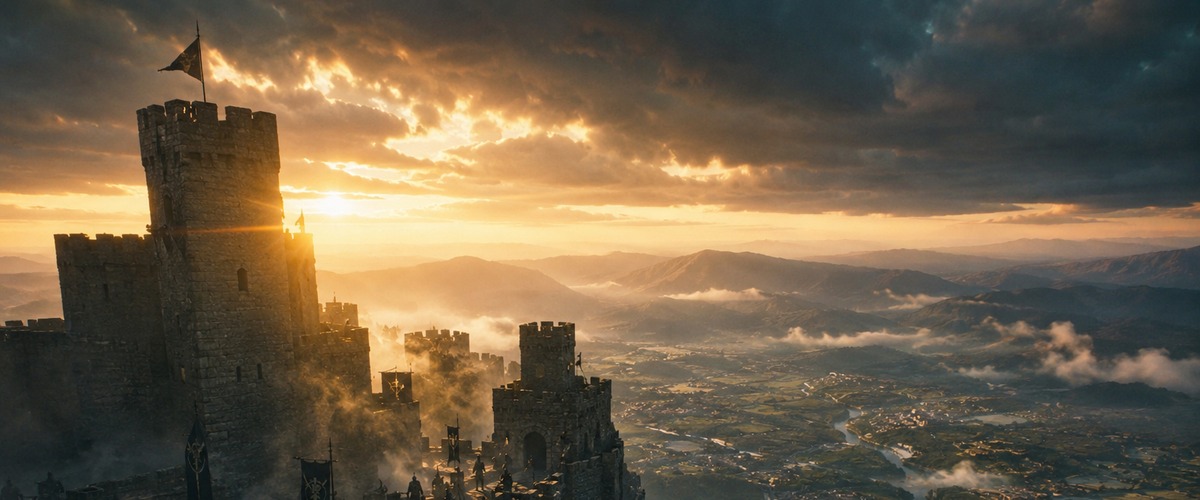
- Crane rising reveals fortress scale progressively — the ascent IS the storytelling
- Morning mist conceals then reveals, creating mystery before the golden light breaks through
- Anamorphic lens flares on dawn light signal cinematic epic from the first frame
- Opening act reveal of an ancient kingdom or empire
- Epic fantasy or historical war film establishing shot
- Game of Thrones or Dune-style world introduction
- Push-in builds dread slowly — the warrior's stillness against the burning city creates tension
- Embers floating upward gives the frame organic life without needing VFX
- Desaturated deep orange grade signals moral ambiguity — the warrior is neither hero nor villain
- A lone hero's moment of doubt or reckoning
- Post-battle scene showing aftermath from one survivor's view
- Villain's contemplative moment overlooking destruction
- Wide aerial pull-back reveals the full fleet scale that no other angle can — scale is the subject
- Lightning as the sole light source creates unpredictable dramatic contrast across the sails
- Cold blue grade signals danger while the storm creates natural narrative urgency
- Naval battle or fleet departure in historical epic
- The moment an armada is first revealed to the audience
- Period war film's most epic establishing shot
- God's-eye descending crane is the only shot that reveals the marketplace as a living system
- Golden hour light at this angle creates warm practical sources from every market stall below
- Chaotic movement below contrasts with the calm, godlike descent of the camera
- Establishing a vibrant ancient city full of life
- Opening scene of a film set in a historical Middle-Eastern or South Asian world
- Drone-style reveal of a cultural festival or market event
- Orbital circling emphasises isolation — the monk is the fixed point the world revolves around
- Himalayan altitude removes all ambient sound context, creating visual silence
- Mist at this altitude makes the monk appear to exist between earth and sky — literal liminality
- Spiritual transformation scene at a story's turning point
- A character achieving clarity or enlightenment alone
- Opening meditation sequence for a martial arts or spiritual film
- Tilt-up from the base creates the experience of the waterfall's overwhelming scale in real time
- Slow motion in the mist zone makes individual water particles visible — macro within macro
- Natural backlighting through mist creates the waterfall's iconic rainbow halo effect
- Nature documentary climax sequence
- A mythological location reveal — lost worlds, hidden temples
- Environmental storytelling showing raw natural power
- Dolly through the trees creates parallax depth — trees pass at different speeds creating real 3D
- Volumetric shafts only appear when haze is present — the light requires atmosphere to be visible
- Slow movement and scale of the ancient trees communicates time without a single word or clock
- Entering an enchanted, ancient, or sacred forest location
- A meditative scene of solitude in nature
- Fantasy world-building — elven forests, ancient groves, sacred lands
- Time-lapse is the only tool that makes shadow movement across a landscape visible to viewers
- Storm clouds building in acceleration creates the feeling of nature as a living, approaching force
- Locked-off camera makes the land the constant and the sky the drama — reversed hierarchy
- Scene transition from peace to conflict using weather as metaphor
- Nature documentary sequence showing weather as a character
- Ominous pre-battle or pre-disaster sequence in an epic film
- Tracking the eagle requires the camera to move with the subject, making flight feel shared
- Snow-capped ridges below create scale reference that makes the eagle's altitude real and readable
- Warm grade on a cold environment creates the unexpected beauty of high-altitude winter light
- Nature documentary sequence about apex predators or migration
- A symbol of freedom or perspective in a character's arc
- Aerial beauty shot in a travel or adventure film
- Slow motion of the gate rising turns mechanical action into ceremonial gravitas
- Armored soldiers in formation create repeated visual rhythms that slow motion amplifies beautifully
- The gate as threshold is a universal symbol — slow motion gives this crossing narrative weight
- Army marching to war — the moment of no return
- A king or general entering a conquered city
- A period epic's transition from preparation to action
- Low drone altitude creates water-level perspective that reveals terraced rice field geometry
- Sunrise mist at this angle creates a gradient — earth meets sky within a single frame
- Slow movement matches the contemplative pace of agricultural life — camera speed is editorial
- Establishing a rural agricultural community in Southeast Asia
- Opening a documentary on food, farming, or sustainable living
- A meditative travel film sequence in Vietnam, Bali, or the Philippines
- Extreme macro plus slow motion reveals the physics of surface tension — invisible at normal speed
- Each circular ripple expanding is a perfect visual metaphor for consequence and cause
- Shallow depth at macro scale makes individual droplets the entire world of the frame
- Emotional pause or moment of reflection in a narrative film
- Nature poetry sequence — a film that breathes between action scenes
- Opening or closing meditation on impermanence or time
- Tracking alongside the river creates a continuous-time reveal as the forest unfolds
- Autumn colour directly above creates a canopy ceiling the camera moves beneath — tunnel of gold
- Water surface at camera level gives the river's eye view — a non-human perspective
- Seasonal change montage in a nature documentary
- A journey sequence where the river is both path and companion
- Peaceful interlude between story acts — a moment of natural beauty
- Macro time-lapse of blooming is the only way to make plant movement visible to human eyes
- Extreme close-up at this scale makes petal unfurling look geological — time and scale are inverted
- Colour transformation from green bud to full colour is a complete arc within a single shot
- Metaphor for birth, awakening, or new beginning in a story
- Nature documentary sequence on plant life and pollination
- A visual transition into spring or renewal in a feature film
- Aerial descent into the crater creates the experience of entering another world
- The electric blue volcanic lake creates a colour impossibility — nature imitating the unnatural
- Descending rather than hovering makes the viewer a participant in discovery, not an observer
- A hidden world reveal — the valley beyond the mountains
- Sci-fi or fantasy establishing shot of an alien or mythological location
- Travel documentary's most dramatic geographical reveal
- Slow motion of a breaking wave at golden hour is the maximum expression of water's drama
- Backlight at this angle makes water droplets glow amber — each particle becomes light itself
- The contrast between the wave's violence and the slow motion's serenity is the entire emotion
- Emotional release scene — a character letting go at the ocean
- A documentary on coastal life or the power of nature
- A romantic or introspective scene using the ocean as emotional mirror
- Tracking through bamboo creates a repeating vertical pattern that the camera cuts through
- Dappled light in bamboo creates a natural strobe effect as the camera moves — unique to this plant
- The bamboo's hollow sound implied by visual sway creates the scene's ambient world without audio
- A film set in Japan, China, or Southeast Asia — cultural grounding
- A martial arts or training sequence in a natural dojo
- A meditative walk or moment of decision in a natural setting
- Real-time ice crystal formation is invisible without macro — the camera reveals what eyes miss
- The geometric precision of ice patterns contrasts with organic randomness — order from chaos
- Cold colour of ice against warm interior breath creates the clash of temperatures made visible
- A winter-themed title sequence or atmospheric opening
- A science documentary segment on crystallography or physics
- A metaphor for beauty in harsh conditions in a narrative film
- Milky Way time-lapse requires a locked-off camera — the earth's rotation becomes the movement
- The lone figure creates mandatory scale reference — without it, scale is incomprehensible
- Long exposure stars create star trails, turning the sky into an arc of light over the small human
- A character's moment of cosmic perspective or existential contemplation
- The opening of a science fiction film grounded in real space
- A documentary on astronomy or humanity's relationship with the universe
- Water-level tracking of the crossing creates the danger of the river as an active participant
- Animals at this proximity in motion create dust, sound, and chaos that the camera is inside
- The wildebeest crossing is one of nature's most dramatic annual spectacles — the angle honours it
- Nature documentary's peak action sequence involving animal behaviour
- A metaphor for collective courage — the leap into the unknown
- An establishing sequence for an African savanna documentary
- Rain-soaked street doubles visual complexity — every surface becomes a screen showing the city
- Neon reflections in puddles at this angle create upside-down city beneath the real one
- Tracking at walking pace creates accompaniment — the camera as the unseen companion
- Noir or thriller scene where the city is a character, not a backdrop
- A lonely character walking without destination in a city at night
- An opening shot establishing urban isolation or alienation
- Overhead aerial of an intersection reduces people to abstract moving points — system over individual
- Rush hour from directly above reveals the intersection as a living machine with its own logic
- Time compression (implied) would show the pattern — the locked-off overhead reveals the design
- A documentary about cities, infrastructure, or human behaviour at scale
- An opening that establishes the overwhelming scale of urban life
- A sequence contrasting collective human movement with individual isolation
- Moving through commuters rather than watching them makes the viewer part of the crowd
- Subway fluorescent light is harsh and unflattering — deliberately democratic and real
- The crowd's indifference to the camera creates the anonymity of city life as the subject
- A character arriving in a new city — overwhelmed, anonymous, beginning
- A thriller sequence where someone is being followed through a crowd
- An establishing shot for any story set in a dense urban environment
- Day-to-night rooftop time-lapse shows the city as a living organism that changes state
- Lights appearing one by one at dusk create a visual equivalent of breathing — the city awakening
- The fixed perspective over time creates a scientific observation — the city as specimen
- A film's opening sequence establishing a city's 24-hour character
- A montage of time passing for a city-dwelling protagonist
- A documentary on urban life showing the rhythm of the city
- Low angle tracking of a street musician inverts the hierarchy — pavement level gives dignity
- The street behind creates bokeh of moving pedestrians — the musician is still in a moving world
- Available music implied by the saxophone creates an audio-visual contract with the viewer
- A character study of a working artist living by their craft
- A feel-good urban sequence showing the humanity within city chaos
- A documentary on street music or the informal economy of cities
- Crane rising above a market reveals it as an organism — the chaos becomes visible pattern from above
- Dusk light creates warm practical sources from every stall — the market lights itself
- The transition from chaos-level to order-from-above is the philosophical point of the shot
- Establishing the heart of a city in South Asia or the Middle East
- A scene where a character discovers their neighbourhood from a new perspective
- A travel documentary's establishing shot for an Indian or Moroccan market
- 3am empty streets create the city at its most honest — the infrastructure without its purpose
- Eye-level movement through silence creates dread without any narrative threat
- Isolated practical street lights create pools of light separated by darkness — natural film noir
- A character walking home after a traumatic or transformative event
- An insomniac's or night-shift worker's experience of the city
- A thriller or horror sequence establishing a vulnerable character in urban space
- Extreme close-up of rain on cobblestone creates an abstract landscape — familiar made alien
- Reflections in the puddle create a second inverted world — the city seen from below
- Slow motion of each impact reveals the physics of fluid dynamics invisible at normal speed
- An emotional insert shot — rain as tears, the city weeping with a character
- A sensory pause in a story — slowing down to notice the small beautiful things
- A visual poem sequence in an art-house or character-driven film
- Weaving through a night market rather than observing creates immersive sensory experience
- Warm practical food stall lights create the market's own lighting rig — authentic and alive
- The smell and sound implied by the visual chaos creates a multi-sensory memory for the viewer
- Establishing the heart of Bangkok, Ho Chi Minh, or any Southeast Asian night market
- A food documentary's most visceral and alive sequence
- A character discovering a new culture through its street food and nightlife
- Looking down a corridor of skyscrapers creates vanishing point geometry — the city as architecture
- Fog rolling between towers gives the buildings atmosphere and mystery — weather as set design
- The locked-off static shot lets the fog's movement create all the drama — patience as technique
- Establishing a corporate or dystopian urban environment
- A scene suggesting a character trapped within the architecture of power
- A thriller's opening shot suggesting the scale of the system the protagonist faces
- Push-in toward a face framed by rain-streaked glass creates layered visual metaphor — barrier and longing
- Window light on the face creates soft directional light with no equipment needed
- The reflected street lights on wet glass create moving bokeh that implies the outside world
- A character waiting, hoping, or mourning — internal emotional states externalised
- A romantic scene — waiting for someone who may not come
- A contemplative character moment at a story's emotional turning point
- Tracking from behind a dancer creates anticipation — we follow without yet seeing their expression
- The empty stage creates maximum contrast — one human figure in a space designed for performance
- Stage footlights from below create dramatic underlighting that flattens for atmosphere
- A performer's private moment before a debut or high-stakes performance
- A dance film's sequence contrasting solitude with the expectation of the crowd
- A metaphor for a character stepping into a new role or identity
- Extreme close-up of weathered hands reveals biography — decades of work are written in the skin
- Morning harbour light through nets creates pattern shadows across the hands
- Slow, deliberate movement matches the hands' pace — the camera respects the work's rhythm
- A portrait of craft, skill, and decades of dedicated labour
- A documentary character study where hands are the biography
- An intergenerational story showing the passing of traditional knowledge
- Steam rising around a chef creates natural atmosphere and light diffusion simultaneously
- Kitchen chaos behind the chef creates depth layers — focused subject against busy background
- The plating moment is the chef's art at its most concentrated — focus and precision made visible
- A food documentary's portrait of a chef at the height of their craft
- A scene establishing a character's passion and dedication to their work
- A restaurant film's climactic service sequence
- Orbit around a static subject creates the illusion that the world moves around the martial artist
- Misty forest morning light creates natural volumetric atmosphere without any equipment
- The fighter's stillness against the orbiting camera creates the stillness-before-explosion tension
- A martial arts film's training or meditation sequence
- A character demonstrating mastery before a major confrontation
- A philosophical film's visual representation of centred stillness amid chaos
- Child running in slow motion through wildflowers is the visual language of pure, uncomplicated joy
- Wildflower colours at this speed create a kaleidoscope of colour streaks around the moving child
- Tracking at the child's level (not adult height) respects and captures their experience authentically
- A childhood memory sequence — nostalgia without sentimentality
- A parent watching their child — joy as the dominant emotion
- A contrast scene between an innocent childhood moment and adult darkness in a story
- Push-in on piano keys to the exclusion of the pianist creates music as the protagonist
- Soft candlelight on ivory keys creates the warmth associated with intimate performance
- Slow, deliberate movement matches the music's intended pace — camera tempo matches musical tempo
- A classical or jazz performance documentary's most intimate sequence
- A character losing themselves in music as escapism or passion
- A film's emotional crescendo scene where music is the only language left
- Slow motion close-up of a boxer's face between rounds reveals the humanity inside the sport
- Sweat at this proximity creates texture detail that makes physical effort tangible and real
- The corner — rest before the next round — is the private moment the crowd never sees clearly
- A boxing film's most introspective and human moment
- A sports documentary showing the private cost of public performance
- A character study of an athlete discovering their limit
- Incense smoke curling upward creates natural organic movement — the shrine breathes with her
- Temple light from below candles creates the authentic warm underlighting of sacred spaces
- The woman's stillness against the smoke's movement creates the meditation's visual representation
- A character's moment of prayer, seeking, or spiritual communion
- A documentary on religious practice or personal faith
- A film set in South or Southeast Asia establishing cultural and spiritual context
- Tracking through a dark lab with screen glow creates the sci-fi aesthetic with zero production cost
- Multiple screens creating the only light source gives the scientist a data-lit face — information as illumination
- Following from behind creates mystery — we accompany without understanding where we're going
- A scientific discovery or late-night breakthrough sequence
- A thriller establishing an antagonist in their domain of expertise
- A character study of someone consumed by their work
- Wide shot of a megacity at night from altitude requires scale to be the subject — nothing else works
- Flying vehicles leaving light trails create the city's skyline as a living, moving organism
- Neon light from below and darkness above creates the vertical contrast of a city fighting the dark
- A sci-fi film's first reveal of the future Earth or an alien civilisation
- Establishing the scale of a dystopian or utopian future city
- A Blade Runner or Cyberpunk 2077-style world introduction
- Push-in toward an astronaut at an observation window creates the intimacy of awe — vulnerability in space
- Stars visible beyond the window make Earth's absence the subject — home as negative space
- The astronaut's back to camera keeps their emotion private, forcing the viewer to project their own
- An astronaut's moment of cosmic loneliness or wonder
- A space film's most introspective and philosophical sequence
- A scene establishing what has been left behind and the cost of the mission
- Tracking through a bunker corridor creates the claustrophobia of underground survival
- Emergency strip lighting creates harsh institutional light — no comfort, only function
- Survivors in motion communicates ongoing crisis — stillness would suggest safety that doesn't exist
- A post-apocalyptic film establishing the grimness of underground survival
- A military thriller showing the interior of a wartime command structure
- A dystopian film's establishing sequence of how humanity has adapted to catastrophe
- Orbital shot around an alien structure creates the sense that the object has no readable orientation
- Desert planet environment at this scale makes the structure's origin completely inexplicable
- The architecture's non-human scale and geometry creates awe through incomprehensibility
- A first contact sequence — humans encountering something beyond comprehension
- A sci-fi mystery film's central enigma reveal
- An alien world establishing shot that communicates the absolute foreignness of the environment
- Rain streaming down a robot's chrome surface creates the aesthetic tension between machine and weather
- A robot standing still in heavy rain is a paradox — why would it? The question IS the scene
- Cold blue environmental light against the metallic surface creates maximum contrast between elements
- A robot becoming self-aware — standing in the rain, experiencing weather for the first time
- A philosophical sci-fi scene about machine consciousness and sensation
- A post-apocalyptic film where machines outlive their creators
- Slow push-in toward a portal creates the most primal of cinematic tensions — the unknown ahead
- Crackling energy at the portal edges creates the visual language of reality breaking down
- Beyond-the-portal reveals the destination at the moment the viewer has maximum curiosity
- A time travel or dimensional portal crossing sequence
- A fantasy film's magical transportation moment
- A sci-fi film's most visually spectacular scene — the gateway to another world
- Low altitude over an ocean planet creates the visual sensation of flight that orbital shots cannot
- Twin moons create light from two sources — the unique light quality of an alien world's night
- The foam trails of the ship on alien water prove the water's existence more convincingly than description
- An alien ocean world's most poetic establishing sequence
- A sci-fi film's beauty-of-space sequence — wonder rather than threat
- A scene establishing the specific alien environment that will define a character's new world
- Jungle reclaiming a city in time-lapse is the visual language of civilisational collapse
- Vines growing over screens creates the irony of nature defeating the technology that displaced it
- This shot works because viewers can calculate backwards — the collapse becomes comprehensible through the plants
- A post-apocalyptic film's establishing shot — what happened to the old world
- A climate change documentary's most powerful visual metaphor
- A sci-fi film's prologue showing Earth after humanity's departure or defeat
- Spell effects from hand movements require the camera to be close enough to see the precision
- Dark forest with spell-generated light creates a light source the cinematographer doesn't control — discovery
- Magic light in darkness creates the same visual dynamic as candlelight — intimate, directional, mysterious
- A fantasy film's magic system introduction — establishing the rules of the world
- A villain or wizard's most powerful scene of ability demonstration
- A training sequence where a character discovers or masters their power
- Rising crane above a battlefield creates distance that transforms individual combat into pattern
- Medieval battle at scale requires elevation — ground level shows chaos, aerial shows the shape of conflict
- The cold mist of a battlefield at dawn creates the dehumanising grey of war — colour grade does the rest
- A medieval epic's climactic battle sequence overview
- A war film's establishing shot that communicates scale before descending to the personal cost
- A fantasy battle — armies of different species or factions meeting on a field
- Tracking a motorcycle through traffic at its own speed creates genuine velocity without camera tricks
- Neon city night creates the maximum number of light sources to motion-blur as the bike passes
- Handheld at speed creates organic vibration that feels more authentic than stabilised tracking
- A chase sequence in a crime thriller or action film
- An establishing sequence for a character defined by speed and risk
- A motorcycle film's most viscerally exciting sequence
- Slow motion glass shattering captures physics that happens in under 0.1 seconds — invisible otherwise
- Morning light through the glass creates rainbow prism effects as each shard catches the light differently
- Each shard carrying a reflection of the building creates the building destroying itself — visual irony
- An action film's signature explosive destruction sequence
- A disaster film's money shot — the moment everything changes
- A thriller's visually spectacular climax sequence
- Tracking alongside a sprinter at shoulder height gives the sensation of running alongside an elite athlete
- Shoulder level creates a frame where the track becomes an abstract stripe rather than a surface
- Shallow depth at this proximity makes the athlete's form the only sharp element — technique as subject
- A sports film's race sequence — building to the climactic performance
- An athlete's training montage showing dedication to perfection
- An Olympic or championship documentary's most intimate and human sequence
- Overhead drone of a mountain road chase creates the chase's geometry — the pursuit as a pattern
- Mountain switchbacks from above create a visual puzzle — which car is gaining on which
- The landscape's scale from above makes the cars tiny and the stakes enormous — power of proportion
- An action film's car chase in a mountain setting
- A spy thriller's escape sequence through dramatic terrain
- A racing documentary's most dramatic aerial perspective
- Handheld through a ruined building creates the kinetic instability of an active conflict zone
- Rubble dust in shafts of light from broken walls creates natural atmosphere and horror simultaneously
- The soldier's perspective (camera at their back) makes every corner a potential threat — suspense through POV
- A war film's most intense and claustrophobic combat sequence
- A video game adaptation's immersive first-person-style sequence
- A documentary about urban warfare or disaster rescue operations
- Extreme close-up at the moment of impact makes the viewer feel the physics of contact
- Sweat droplets leaving the fighter's face at this scale create an involuntary physical response in the viewer
- Slow motion at 1000fps reveals the face's deformation on impact — biology as spectacle
- A boxing film's defining punch — the moment the fight turns
- A martial arts film's signature technique sequence
- A sports documentary's impact study — the physical cost of combat sport
- Tracking a free runner across rooftops requires the camera to match the human's impossible pace
- Rooftop level creates the sensation of height without showing the drop — psychological rather than visual
- The city becomes an obstacle course — architecture as antagonist, the runner as the protagonist
- A parkour or free running sequence in an action film
- A chase scene where the environment is as dangerous as the pursuer
- A character introduction for someone who moves through the world differently — with freedom
- Low angle helicopter landing creates the rotor downdraft visible through flattened grass — environment responding to the machine
- Silhouettes emerging from the dust cloud creates the dramatic reveal of who is arriving
- The downdraft as a physical force on the environment proves the helicopter's power without narration
- A military film's dramatic extraction or arrival sequence
- A thriller's VIP arrival creating threat or tension
- An action film's most visually spectacular mid-sequence arrival
- Push-in on chess players creates the visual representation of intellectual combat — strategy is the action
- Close-ups on hands moving pieces makes the physical gesture carry the weight of each decision
- The intense focus of the players creates tension through stillness — the opposite of action film energy
- An intellectual thriller's climactic confrontation scene
- A character study establishing someone as strategically brilliant
- A period drama's scene where the outcome of a game decides a political or personal fate
- Tracking a surgeon's hands during surgery creates tension through precision rather than chaos
- Surgical lighting creates the most controlled and deliberate light in any real-world environment
- The surgeon's control against the life-or-death stakes creates the ultimate low-action, high-stakes scene
- A medical drama's most intense and skilled surgical sequence
- A character study establishing surgical mastery — calm under impossible pressure
- A thriller where the surgery IS the climax rather than a scene within it
- Aerial of a volcanic eruption at night creates lava as light source — fire illuminating from below
- Rivers of lava from altitude create abstract patterns — geology as abstract art at this scale
- Night sky above versus lava glow below creates the ultimate contrast between cold space and hot earth
- A natural disaster documentary's most spectacular aerial sequence
- A mythological film establishing the power of elemental forces
- A sci-fi film's alien planet with active geology — establishing threat and beauty simultaneously
- Camera at fish level within a coral reef creates the experience of being inside the ecosystem rather than observing it
- Bioluminescent coral creates light from within the frame — the ocean generating its own illumination
- Slow movement through the reef matches the fish's pace — the camera adopts the fish's temporal experience
- An underwater documentary's most visually spectacular sequence
- An establishing sequence for a story set on a Pacific island or marine environment
- A sci-fi film's alien ocean planet interior — beauty and strangeness simultaneously
- Locked-off static shot of a train station at rush hour turns human flow into a pattern study
- The static camera makes the humans the only moving element — humanity as a river through architecture
- Rush hour compression reveals the station's true purpose — a machine for moving humans efficiently
- A city documentary establishing urban transportation and the human rhythm of commuting
- An opening sequence establishing that a character is about to enter or leave a city
- A visual essay on anonymity — the individual within the collective
- Two sets of hands in frame creates an intergenerational connection — skill being passed through touch
- Kitchen warmth creates natural soft practical lighting that makes the scene feel safe and intimate
- The focus on hands rather than faces makes the teaching and learning the relationship — skill as love
- A family film's most tender intergenerational bonding scene
- A documentary about culinary tradition being passed from old to young
- A character's origin story — the moment they learned their most important skill from someone they love
- Slow motion re-entry creates the most physically dramatic moment in space travel — heat and violence
- Heat shield glowing creates its own light source — the spacecraft illuminated by the atmosphere it's destroying
- The deceleration forces implied by the slow motion make the physics of re-entry tangible and terrifying
- A space film's most dangerous and visually spectacular sequence — the return home
- A sci-fi film establishing that space travel has real physical consequences
- An astronaut film's climactic return sequence after a long mission
- Chase through a library creates a uniquely architectural obstacle course — shelves as labyrinthine walls
- Books falling create a trail of chaos that shows the chase's path — the aftermath as a map
- The incongruity of violence in a place of knowledge creates dark comedy or dramatic irony depending on tone
- An action-comedy's most inventive chase sequence through an unlikely environment
- A thriller establishing that even the most civilised spaces can become dangerous
- A genre-subversive chase scene — unexpected setting creates memorable set piece
- Descending crane toward a lone tree creates the tree as a monument — singular, purposeful, permanent
- The vast plain around the single tree makes scale reference impossible — the tree could be any size
- Overcast light creates no shadows, making the tree's silhouette the only three-dimensional cue in the frame
- A philosophical or existential film's most meditative sequence
- A visual metaphor for solitude, resilience, or singular purpose
- A nature documentary's most quietly powerful sequence — the landscape as subject
- Macro tracking at a bee's flight height creates the lavender field as a towering forest
- The bee's movement through flowers is non-linear and unpredictable — the camera must improvise
- Shallow depth at macro scale makes adjacent lavender blossoms blur to purple — saturation without colour grading
- A nature documentary's most intimate insect behaviour sequence
- A visual metaphor for purpose, pollination, and interdependence in nature
- A sensory film essay on summer, abundance, and the small beautiful world humans miss
- An abandoned amusement park at dusk creates nostalgia horror — joy frozen in time
- A slowly turning carousel that has no rider and no power source creates the uncanny — movement without agency
- Faded colours of amusement park rides at this light level create the colour palette of dreams or nightmares
- A horror film's most visually unsettling location sequence
- A post-apocalyptic film exploring what human joy looked like before the collapse
- A melancholy character scene where the character confronts what has been lost from their childhood
- Close tracking of an artist's brush hands creates the painting's creation as a kinetic performance
- Large canvas requires the camera to track — the painting's scale demands movement rather than static framing
- The gesture and speed of brush strokes reveals personality — aggressive, tentative, or confident tells us who the artist is
- An art documentary's most intimate portrait of a painter at work
- A character study where the art is a window into an otherwise private person
- A biopic's sequence capturing an artist's creative process at its most inspired
- Wide shot of a generation ship in deep space requires the vessel to occupy most of the frame for scale
- Deep space context has no reference points — the ship's size is only understood through internal scale cues
- The drifting movement suggests the ship is coasting between destinations — the long, quiet in-between of space travel
- A generation ship sci-fi film's most epic establishing sequence
- A story about the middle of a very long journey — the waiting and drifting
- A hard sci-fi film establishing the reality of interstellar travel's actual scale and duration
- Underwater tracking toward a shipwreck creates the archaeological thrill of discovery in the deep
- Light diminishing with depth creates natural colour grading — blue then green then black as depth increases
- The freediver without equipment creates vulnerability — human body against the ocean's indifference
- An underwater documentary's most dramatic dive sequence
- A thriller or adventure film where the prize is in the wreck
- A film about the ocean's depth as both beauty and existential threat
- Shadow time-lapse across an ancient temple reveals the sun's movement as a sundial — the temple knew time
- Dawn to dusk compression shows the temple's relationship with light that took millennia to design
- The unchanging stone against the changing light creates the contrast between human timescales and geological ones
- An archaeological documentary's most meditative and visually stunning sequence
- A travel film establishing an ancient site as the complex, designed structure it truly is
- A scene in a historical or mythological film that establishes the age and weight of a civilisation
- Low angle at savanna level makes the elephant herd's silhouette against sunset completely monumental
- Sunset backlight turns the dust the elephants raise into golden halos — nature's lighting rig
- The herd moving as one organism creates the collective intelligence of elephants visible as choreography
- A nature documentary's most iconic and emotionally powerful wildlife sequence
- A conservation film's most beautiful argument for what would be lost
- An African wildlife film's signature shot — the one viewers remember for years
- Descending aerial into a narrow medina alley creates architectural intimacy that ground-level cannot achieve
- Laundry strung across the alley creates a textile ceiling — the neighbourhood's private domestic life visible from above
- The drone's perspective reveals the medina's labyrinthine structure that is invisible to those inside it
- A travel documentary establishing an ancient Islamic city's living residential architecture
- A film set in Morocco or the Maghreb — the most visually distinctive urban environment in the world
- A scene establishing the sense of being lost inside a city that predates the grid
- Dawn light on still water creates mirror reflections that double the frame — the fisherman exists in two worlds
- Throwing a circular net is a single fluid motion that begins and ends within a few seconds — the perfect action beat
- The fisherman at dawn alone on his boat creates the solitude of a profession that predates civilisation
- A portrait documentary's opening sequence establishing a character through their daily labour
- A film about traditional livelihoods and the dignity of physical work
- A meditative scene in a story where a character has returned to something essential and simple
- Tracking at tree level alongside a rally car creates the sensation of the forest attacking the car
- Trees passing at this proximity create a natural reference point for speed — the blur reveals the velocity
- Gravel spray from the car's tyres is the signature visual of rally racing — the road becoming a projectile
- A motorsport documentary's most viscerally exciting in-stage sequence
- An action film's chase through a forest where the environment creates constant near-misses
- A racing film establishing the specific danger and skill required by rally driving
- Close-up pan across a spacecraft control panel makes the complexity of space travel tangible and readable
- LED and screen light in zero gravity creates the specific light quality of a cockpit — no ambient, only instrument
- The deliberate movement of the pan creates a visual inventory — the viewer learns the ship's system through the camera's journey
- A hard sci-fi film establishing the reality and complexity of spacecraft operation
- A scene where a character must locate a specific control in a crisis — the pan creates the search
- An establishing sequence for a space station or spacecraft interior — the world building before the story
- Flying through a canyon rather than above it creates the walls as a subject rather than a feature
- River far below creates depth reference — the canyon's height made readable through scale comparison
- The confined space of the canyon creates the drone's equivalent of a tracking shot through a corridor
- A nature documentary's most dramatic geological sequence
- An adventure film's establishing sequence for a canyon-based set piece
- A visual meditation on geological time and the power of water to carve stone over millennia
- Slow motion hummingbird creates visible wingbeats from what are normally invisible blurs
- Red flower against green background creates complementary contrast — the hummingbird's preferred palette
- The hummingbird hovering creates the paradox of motion and stillness simultaneously — wings moving, body fixed
- A nature documentary's most technically challenging and visually rewarding sequence
- A visual metaphor for precision, energy, and the beauty of specialisation
- A sequence establishing the extraordinary biodiversity of a tropical or subtropical ecosystem
- Locked-off exterior of a lit cafe window creates the most elemental voyeuristic composition in cinema
- Rain on the glass between observer and observed creates the barrier that separates the watcher from the warmth
- The man inside reading, unaware of observation, creates intimacy and privacy simultaneously
- A scene establishing a character's loneliness or exclusion from ordinary warmth
- A winter film's most atmospheric and contemplative sequence
- A romantic film's scene where one character watches another without yet being known to them
- Welding sparks in slow motion create arcs of light that transform industrial work into visual fireworks
- The mask hiding the welder's face makes the sparks the character — the work speaks for the person
- Industrial sparks create their own light source — the welder illuminated by the fire they create
- A documentary celebrating the beauty of skilled industrial labour
- An establishing sequence showing a character whose work is physically demanding and dangerous
- A visual essay on the aesthetics of manufacturing, construction, or industrial creation
- Directly overhead tracking of a butterfly swimmer creates the stroke's geometry as abstract art
- The swimmer's arms creating symmetric bow waves creates a kinetic symmetry only visible from directly above
- The overhead removes the athlete's face — the body becomes the instrument, the stroke the music
- A swimming sports documentary's most visually original sequence
- An artistic sequence in a sports film that transcends the sport and becomes dance
- A sequence establishing an elite swimmer's technical mastery through the beauty of their form
- Slow push-in through foggy swamp creates the sensation of entering a space from which return is uncertain
- Dead trees and hanging moss are the established visual language of dread in Southern Gothic and horror
- Still water in fog removes all spatial reference — the swamp becomes boundless and unmappable
- A horror or thriller film's most atmospheric and dread-filled location sequence
- A Southern Gothic or dark fantasy film establishing its most dangerous and beautiful environment
- A fantasy film's forbidden or cursed location — the place the protagonist was warned not to enter
- Aerial of storm swells from above creates the ocean as a moving geological event — waves as mountains
- Storm light from a break in the clouds creates dramatic contrast across the wave faces
- The repetitive pattern of swells from altitude creates the ocean's rhythm as a visual pulse
- A maritime documentary's most powerful sequence establishing the ocean as a force of nature
- A storm at sea sequence in a nautical adventure or disaster film
- A visual meditation on the ocean's indifferent power — a character made small by scale
- Cherry blossom petals in slow motion create the Japanese aesthetic of mono no aware — beauty in transience
- Tracking through the forest rather than across it creates the experience of being inside the bloom
- The pink and white of blossom against sky creates a colour palette that exists for only days each year
- A film set in Japan during cherry blossom season — the season as emotional context
- A visual metaphor for the brevity of beautiful things — love, youth, or a relationship
- A travel documentary's establishing sequence for Japan's most culturally significant natural event
- Close tracking of a hand on a brass railing creates haptic memory — the viewer feels the cool metal
- Art Deco architecture behind the hand creates the world through architecture rather than exposition
- The hand as proxy for the person makes the building's texture the character's experience
- A period film or noir establishing a character's arrival in a significant building
- A mystery thriller where the building's history is the mystery's location
- A film celebrating architectural beauty — the building as a character in its own right
- Campfire as the sole light source creates the intimate circle that has gathered humans since prehistory
- The storyteller's face half-lit by fire creates the shadows of storytelling itself — mystery and revelation
- The listeners' faces visible in the firelight create the community that story creates — the shared attention
- An oral tradition documentary — a story being told the way stories were always told
- A scene where a character's past is revealed through a story told to others
- A film's emotional heart — the scene around which all other scenes turn
- Handheld tracking through a protest creates the kinetic chaos and urgency of collective action
- Signs and chanting faces visible around the camera create the crowd as a living organism with a voice
- Being inside the crowd rather than observing it makes the viewer a participant — the political is personal
- A political film or documentary's most urgent and alive crowd sequence
- A scene establishing a character's political awakening or commitment to a cause
- A historical drama's recreation of a significant public protest or civil rights moment
- Tracking a delivery drone through a futuristic city creates the city as a three-dimensional network of paths
- Weaving between buildings reveals the city's vertical infrastructure — the sky as a crowded space
- The drone's mundane purpose (delivery) against the spectacular setting creates the normalisation of the extraordinary
- A near-future sci-fi establishing the everyday infrastructure of a more advanced city
- A world-building sequence showing how commerce and logistics work in a future setting
- A scene establishing the protagonist's world before an event disrupts it — the ordinary before the extraordinary
- Slow motion avalanche creates the paradox of an apocalyptic event in beautiful slow detail
- Distance — a far mountain face — creates safety while allowing full appreciation of the avalanche's scale
- The snow cloud billowing outward creates the avalanche's own weather — a self-created storm system
- A mountain disaster documentary's most spectacular natural event sequence
- An extreme sports film's most dangerous and beautiful moment — the hazard that defines the sport
- A nature film's most powerful demonstration of snow's accumulated mass and gravitational energy
- Desert flash flood time-lapse makes visible a geological event that happens too fast to observe consciously
- A dry riverbed suddenly filling with churning water creates the before-and-after that defines climate volatility
- The dry sand becoming moving water creates the transformation that flash floods effect — landscape change in minutes
- A climate change documentary's most dramatic illustration of desert weather volatility
- A survival film's central disaster — the flash flood that separates characters or destroys equipment
- A nature documentary establishing the extreme weather events that define desert ecosystems
- Looking straight down on a roundabout creates traffic as a moving mandala — circular, hypnotic, patterned
- The overhead perspective reveals the traffic's logic — lanes merging and separating in choreographed flow
- The circular pattern of the roundabout becomes abstract from directly above — a diagram of order made beautiful
- A time-lapse city film's most architecturally interesting aerial composition
- A documentary sequence on urban planning and the systems that keep cities moving
- A visual essay on the beauty of designed human systems observed from outside the system
- Extreme close-up of origami hands creates the paper's texture as the primary visual subject
- The transformation of flat paper into three-dimensional form creates the closest thing to magic in craft
- Slow, precise finger movements create tension — the potential for a mistake that cannot be undone
- A documentary portrait of a craft master — the patience and precision of a traditional art form
- A meditative sequence in a film where a character finds peace in focused manual work
- A scene establishing a character who is patient, precise, and capable of creating beauty from almost nothing
- Tracking a tightrope walker between buildings creates the city as both stage and potential consequence
- The camera at tightrope level creates the walker's perspective — the drop implied rather than shown
- The wind visible in the walker's clothing creates the environmental threat that the rope cannot
- A circus or extreme sports film's most nerve-wracking and visually arresting sequence
- A heist film's most improbable approach sequence — the building-to-building crossing
- A character study of someone who finds calm in situations that terrify everyone else
- Wide shot of a starship battle requires distance — the ships must be small enough to see both simultaneously
- Energy weapon fire creates the only light source in deep space — the battle illuminates itself
- The ringed planet creates a compositional backdrop that makes the battle's scale and beauty simultaneous
- A space opera's climactic battle sequence — the war for the system or the universe
- A sci-fi film's most visually spectacular set piece — the battle that defines the conflict
- An establishing sequence showing that the war in space is as beautiful as it is destructive
- A sandstorm approaching across a desert is visible from kilometres away — anticipation before the event
- The wall of sand thousands of metres high creates a geological visual event rather than a weather event
- Time-lapse compression makes the approaching storm feel like a living organism advancing with intention
- A desert survival film's most spectacular and threatening natural event
- A Middle Eastern or Saharan adventure film's most visually distinctive sequence
- A climate documentary's illustration of haboob storms and desertification's visible consequences
- Macro tracking of a spider spinning its web captures the engineering precision that human eyes cannot follow at normal speed
- Dawn light through web threads creates the web as a light-catching instrument — architecture serving optics
- The dew-catching web visible at macro scale proves the web's function as both trap and water collector
- A nature documentary's most technically extraordinary macro sequence — the invisible world made visible
- A visual metaphor for patience, craft, and the creation of invisible systems that catch what they need
- A sensory sequence in a film that slows the narrative to celebrate the extraordinary in the ordinary world
- Dolly through an empty concert hall creates the space as a character — a venue awaiting its purpose
- The empty seats in progressive depth create a perspective corridor that gives the hall's scale
- Moving from back to stage creates the audience's journey reversed — from observer's position to performer's position
- A music documentary's most poetic sequence — the hall before or after the performance
- A scene establishing a performer's relationship with the space where their art lives
- A film about loss or absence — the hall that once held a beloved performer or event now empty
- Tracking alongside a cheetah at animal height creates the running experience from inside the speed rather than observing it
- Dust from paws at this proximity creates natural atmosphere that gives physical evidence of the cheetah's contact with the ground
- The African savanna's golden grass at eye level frames the cheetah within its ecosystem — the environment is part of the animal's identity
- A nature documentary's most technically demanding and visually extraordinary sequence
- A visual metaphor for speed, grace, and predatory focus — the most efficient runner on Earth
- A wildlife film's signature sequence establishing the cheetah as the fastest land animal through the experience of the speed itself
About These Cinematic AI Video Prompts
Cinematic AI video prompts are written using the same language that professional cinematographers and directors use on real film sets. Instead of describing what you want to see in everyday words, cinematic prompts specify the camera movement, lens type, lighting setup, color grade, and mood — the technical elements that transform a basic AI video clip into something that looks like it was shot by a professional crew.
This collection of 100 cinematic video prompts covers everything from sweeping aerial establishing shots to intimate character close-ups, from high-energy action sequences to quiet documentary moments. Every prompt in this library has been crafted with real filmmaking principles — the 180-degree rule, motivated camera movement, purposeful lighting direction, and considered color grading.
Whether you are creating content for YouTube, social media, or a short film project, these prompts give you a professional starting point that you can use directly or adapt to your specific scene.
How to Use These Prompts
Tips for Best Results
Frequently Asked Questions
Generate your own cinematic prompts
Use our AI-powered video prompt generator to create custom prompts for any scene.
🎬 Open Video Prompt Generator