50 Car Chase AI Video Prompts
Cinematic pursuit prompts crafted by a VFX artist — tracking, POV, impacts and aerials with locked vehicle identities. Paste into Kling AI, Runway or Sora.
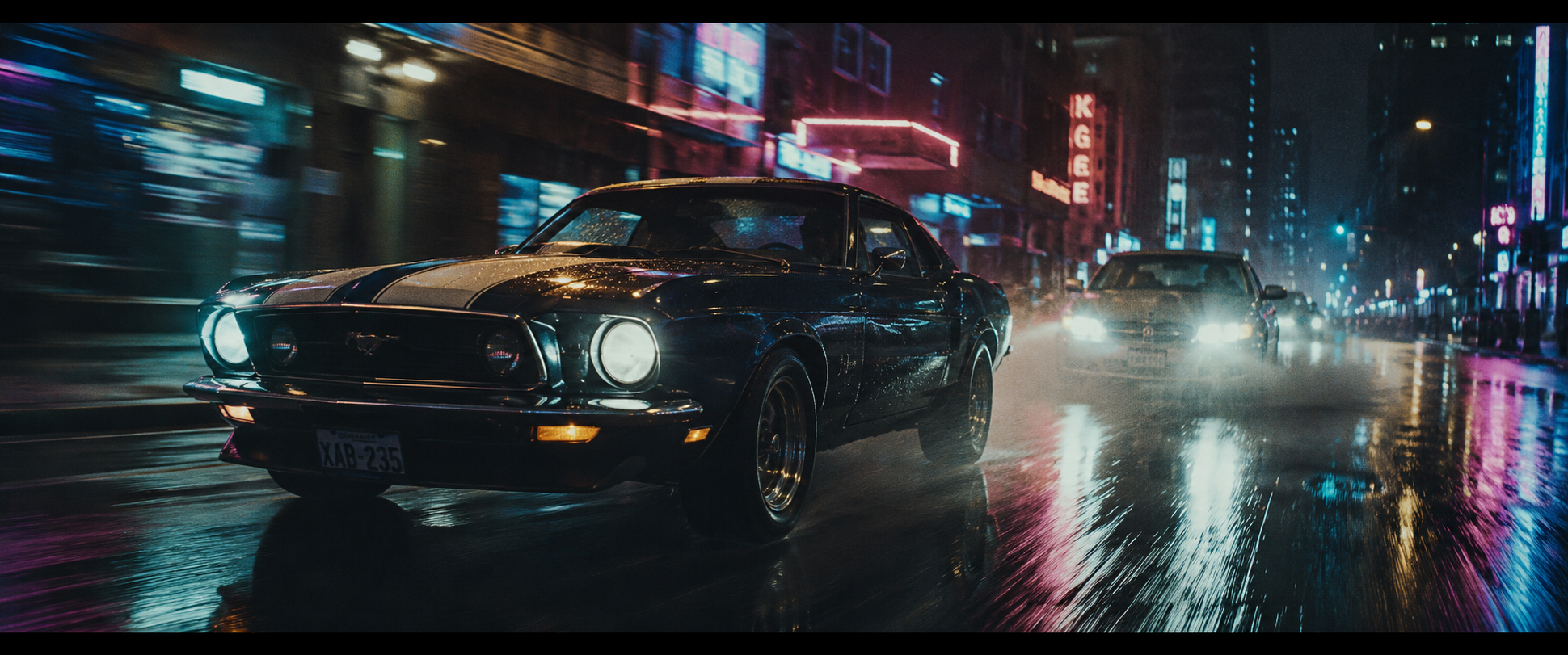
- Matched-speed tracking sells velocity through background blur
- Fixed car descriptors (stripes) stop vehicle morphing
- Wet-road reflections double the production value free
- Chase sequence master shots
- Music video energy beats
- Automotive brand content
- Ground-skim angle is the signature Hollywood chase shot
- Spray toward lens creates depth and danger
- Glowing brake disc implies sustained hard driving
- High-impact chase inserts
- Tyre and automotive commercials
- Trailer moments
- Following POV puts the audience in the pursuing car
- Weaving action reads clearly from directly behind
- The cracked tail light is an identity lock across shots
- Pursuit build-up sequences
- Police chase POVs
- Tension-driving scenes
- Two-car framing shows the duel in one shot
- Gap breathing (close-open) is readable simple motion
- Mirror clip delivers contact without full crash complexity
- Rivalry and duel sequences
- Race climax shots
- Action montage centrepieces
- Slow motion flatters water physics AI renders beautifully
- One environmental event (the flood) anchors the shot
- Neon-through-spray is a spectacular colour moment
- Hero beauty shots
- Slow-motion trailer beats
- Poster-frame moments
- Telephoto compression makes cars feel dangerously stacked
- Head-on framing hides side-panel morph risks
- Lens flare from headlights adds free drama
- Approach and arrival beats
- Tension-stretch moments
- Opening chase reveals
- Wiper sweep gives one clean foreground action
- Rain on glass adds realism and hides artifacts
- Dashboard glow grounds the POV inside a real car
- Driver POV sequences
- Immersive chase moments
- Dashcam-style storytelling
- Hands tell the driving story without a face
- Gear-slam is a single readable power action
- Strobing window light sells speed from inside
- Driver intensity inserts
- Gear-change beats in edits
- Racing content
- One near-miss event keeps the AI motion coherent
- Frame lurch conveys g-force physically
- Over-shoulder keeps a human presence in frame
- Near-miss tension beats
- Reaction-driving moments
- Insurance and safety adverts
- Mirror framing shows pursuer and pursued in one shot
- The broken headlight identifies the villain car instantly
- Eye-flick adds humanity in a single micro-action
- Paranoia and pursuit tension
- Mirror storytelling beats
- Thriller inserts
- Growing headlight is a simple escalating threat
- Spray between cars adds depth layers
- Glare flood gives a natural out-point to cut on
- Threat-closing-in beats
- Chase escalation moments
- Horror-pursuit hybrids
- Single tyre keeps AI wheel physics honest
- Spray toward lens is a guaranteed spectacle
- Macro tread detail sells realism
- Impact cutaways in chase edits
- Tyre brand content
- Slow-motion trailer inserts
- Pedal stamp is chase grammar every audience reads
- Single held action avoids foot-morph risks
- Building vibration implies acceleration without showing it
- Acceleration beats
- Launch and getaway moments
- Rhythm inserts for fast cuts
- Needle sweep is one clean mechanical arc
- Trembling at peak adds strain and danger
- Gauge scratches ground it in a real used car
- Speed escalation beats
- Retro chase aesthetics
- Dashboard storytelling
- Sparks provide self-illumination and energy
- Side-scrape reads clearly with one moving element
- Peeling paint line shows persistent damage for continuity
- Contact and damage beats
- Barrier-scrape action moments
- Consequence shots after collisions
- Mechanical cause-and-effect in one enclosed frame
- Friction glow and smoke are AI-friendly effects
- Sets up the drift shot that follows in an edit
- Drift initiation beats
- Mechanical detail cutaways
- Motorsport content
- Single clip-and-catch keeps crash physics achievable
- Sparks and debris sell force without deformation
- Exit-frame ending gives a clean edit point
- PIT-manoeuvre beats
- Chase escalation contact
- Mid-sequence stakes-raising
- Small-object destruction is far more reliable than car crashes
- Tumbling debris toward lens is a classic trailer moment
- Spinning-to-rest gives a natural end beat
- Near-miss consequence shots
- Slow-motion trailer inserts
- Damage montage pieces
- Soft debris (boxes, fruit) crashes beautifully and safely in AI
- Two-car pass-through in one shot shows the gap in the chase
- Classic chase-movie comedy-chaos beat audiences love
- Chase chaos beats
- Market and street sequences
- Lighthearted action moments
- A spin-out is a crash the AI can complete convincingly
- High angle keeps all geometry readable
- The wobbling hubcap is a perfect deadpan end beat
- Chase resolution shots
- Failure and defeat beats
- Scene enders
- God's-eye view turns the chase into readable choreography
- Parallel S-curves show pursuit logic in one frame
- Height hides close-range vehicle detail risks
- Chase geography establishers
- Sequence openers
- City-scale action beats
- The dive-and-level is the modern signature drone move
- Single continuous move — no cuts for AI to fumble
- Transitions the audience from geography to intensity
- Sequence transitions
- FPV-drone style content
- High-energy openers
- Fixed camera with cars crossing it is maximally stable
- The hanging spray connects the two cars in time
- Under-camera pass gives a visceral proximity beat
- Gap-in-the-chase storytelling
- Bridge and overpass beats
- Tension-timing shots
- Interchange geometry creates natural visual drama
- Two-level separation adds cat-and-mouse story
- Tiny distant cars eliminate all morph risk
- Strategy and pursuit-logic beats
- Epic scale establishers
- Title shots
- Quarter-orbit matched to the drift is one elegant move
- Spiral spray is the money image of wet-road chases
- Entry-exit overlap keeps both cars in the story
- Climax drift beats
- Hero shots for edits
- Sequence finales
- Lane-splitting reads as speed even between stationary cars
- Helmet stripe is the rider's identity lock
- Visor reflections add a free second layer of imagery
- Motorcycle pursuit sequences
- Courier and escape stories
- High-energy openers
- Tunnel light strobing creates rhythm AI sustains well
- One-point perspective keeps geometry dead simple
- Sodium monochrome hides colour inconsistencies
- Tunnel chase beats
- Hypnotic speed sequences
- Music-synced edits
- Dust trail is the daytime equivalent of night spray
- Emerging-from-dust reveals the pursuer dramatically
- Heat shimmer sells speed on an empty road
- Daytime and desert chases
- Road movie sequences
- Mad Max style beats
- Narrow-gap framing creates tension without high speed
- Swinging ladder leaves evidence of the pass
- Steam and puddles fill the frame with motion
- Alley escape beats
- Urban shortcut sequences
- Claustrophobic tension shots
- Oncoming headlight flares deliver danger straight to camera
- Single overtake keeps the manoeuvre coherent
- Bus provides scale contrast to the low muscle car
- Overtake and near-miss beats
- Wrong-lane tension moments
- Chase escalation
- Two-person interior shows stakes through the passenger
- Sliding objects convey g-force honestly
- Back-seat POV puts the viewer in the car
- Passenger panic beats
- Buddy chase scenes
- Immersive interior coverage
- Mirror-road eye rhythm shows divided attention
- Sweat bead is the interior's tension gauge
- Profile framing keeps the face stable for AI
- Driver character beats
- Pressure and focus moments
- Chase drama coverage
- Radio-off is a universal now-it's-serious beat
- Mirror reveal rides in the same frame
- Implied sound design in a silent medium
- Tone-shift moments
- Threat reveal beats
- Tension resets in edits
- Navigation screen narrates the chase's logic
- REROUTING flash is a story beat in one word
- Screen close-up is stable, high-detail AI territory
- Modern chase storytelling
- Wrong-turn tension
- Tech-thriller inserts
- Fuel gauge adds a countdown to the chase
- Two gauges in one frame tell a complete dilemma
- Warning-lamp pulse is simple reliable motion
- Stakes and countdown beats
- Endurance chase storytelling
- Act-two complications
- Two-beat shift rhythm cuts perfectly to music
- Worn shift knob tells years of story
- Enclosed framing removes all background risk
- Acceleration rhythm inserts
- Manual-gearbox action beats
- Racing montage pieces
- The etched warning is a gift of built-in irony
- Mirror reflection shows pursuit without a second setup
- Sideways-crawling raindrops prove the speed
- Iconic detail beats
- Threat-proximity storytelling
- Trailer inserts
- Exhaust flame is a self-lit spectacular micro event
- Heat ripple and shivering water sell the physics
- Launch framing implies the whole getaway
- Getaway launch beats
- Engine power inserts
- Automotive content
- Rolling-at-lens object is a guaranteed dynamic shot
- Spinning neon reflections decorate the motion
- Falling flat gives a musical end note
- Aftermath punctuation shots
- Slow-motion interludes
- Scene transition beats
- ABS shudder is rhythmic motion AI holds well
- Counterpart to the accelerator insert for edit pairs
- Red flood shifts the scene's emotional temperature
- Emergency-stop beats
- Impact lead-ins
- Rhythm inserts for editors
- Glass crazing-then-collapse is a two-phase spectacle
- Tempered-glass cubes render beautifully in slow motion
- Interior glimpse adds story through the breach
- Attack and ambush beats
- Slow-motion trailer shots
- Glass-break punctuation
- Wooden barriers are soft destruction AI completes cleanly
- Spinning sign is the shot's comic signature
- Powering through unslowed shows the driver's commitment
- Roadblock-run beats
- Chase chaos moments
- Pursuit escalation
- Near-T-bone delivers crash adrenaline with no crash
- Taxi nose-dive is one readable physics event
- The rocking settle is a perfect aftermath beat
- Intersection tension beats
- Near-miss set pieces
- Civilian-stakes moments
- Tilt-and-recover gives rollover drama without rollover physics
- Sill sparks mark the exact grind point
- Slam-down and fishtail complete the arc
- Almost-crash climax beats
- Chase peril peaks
- Stunt-style moments
- Aftermath avoids crash physics but keeps consequence
- The still-spinning wheel is cinema's classic epilogue
- Flickering neon paints the mood automatically
- Chase endings
- Consequence and aftermath beats
- Cold-open mysteries
- Foreground bird layer gives the aerial real depth
- Rooftop height balances geography and detail
- Pigeon burst is an organic reaction shot to speed
- Layered aerial sequences
- City-canyon chase beats
- Cinematic scale moments
- Light-only storytelling is striking and morph-proof
- The single headlight pays off the identity lock from above
- Top-down grid reads like a living map
- Abstract and stylised beats
- Title backgrounds
- Strategy visualisation shots
- Silhouette jump hides all mid-air detail risks
- Full-second hang time is the money moment
- Drifting spray connects the jump to the landing
- Jump set pieces
- Hero silhouette shots
- Trailer money frames
- Appear-vanish rhythm through the slabs is hypnotic
- Synced descent is one clean continuous camera move
- Exit burst releases the built tension perfectly
- Parking garage sequences
- Vertical chase beats
- Tension-and-release moments
- Dawn light closes the night-long chase arc
- The growing gap tells the ending without dialogue
- Steam from the loser's bonnet explains everything
- Chase resolutions
- Sequence enders
- Emotional epilogue shots
About These Car Chase Prompts
The car chase is the hardest sequence in AI video — vehicles warp between shots, wheels spin wrong, speed reads fake, and crashes collapse into visual soup. But chases are also where the shot-by-shot method pays off most: real chase sequences are built from dozens of short, single-purpose shots, and short single-purpose shots are exactly what AI video generates best.
Every prompt in this collection is engineered around what current models can actually do. High-speed shots stay at one event each — a swerve, a clip, a wall of spray. Crashes are staged as achievable beats: a mirror exploding off, a spin-out, a fruit stand demolished — not full deforming collisions. And both recurring cars carry locked identity descriptors (the racing stripes, the cracked tail light, the broken headlight) that repeat in every prompt, because that repetition is the only thing standing between a coherent chase and six different cars.
The 50 prompts cover the five shot families every chase edit needs: tracking and pursuit masters, driver POV and interior, macro inserts, impact beats, and aerial geography. Cut in that order — geography, pursuit, interior, insert, impact — and you have a sequence.
How to Use These Prompts
Tips for Best Results
Why AI Cars Morph Between Shots — and How to Lock Them
Generate a "black sports car" in six different shots and you will get six different black sports cars — the model reinvents the vehicle every time, exactly the way it reinvents a character’s dress colour. AI has no memory between clips. The fix is the same trick used for character consistency: give every vehicle two or three unique, damage-level identifiers and repeat them word-for-word in every single prompt.
In this collection the pursued car is always "a black 1970s muscle car with two white racing stripes and one cracked right tail light" and the pursuer is always "a silver modern sedan with one broken left headlight." The stripes, the cracked tail light, the broken headlight — those oddly specific flaws are what force the model to rebuild the same cars. Generic descriptors like "cool" or "fast" do nothing; physical, visible, slightly imperfect details do everything.
Three more rules that keep chases coherent: keep shots to 5 seconds for high-speed action (10 seconds only for wides and aerials), give each shot exactly one event — a swerve, a clip, a spray — never a chain of them, and generate a reference image of each car first so every video shot starts from the same vehicle. Our free AI Scene Builder automates all of this: fixed elements are injected into every shot prompt automatically.
Frequently Asked Questions
Build a full chase with locked vehicles
Scene Builder injects your car descriptions into every shot automatically — no more morphing vehicles.
🎥 Open AI Scene Builder