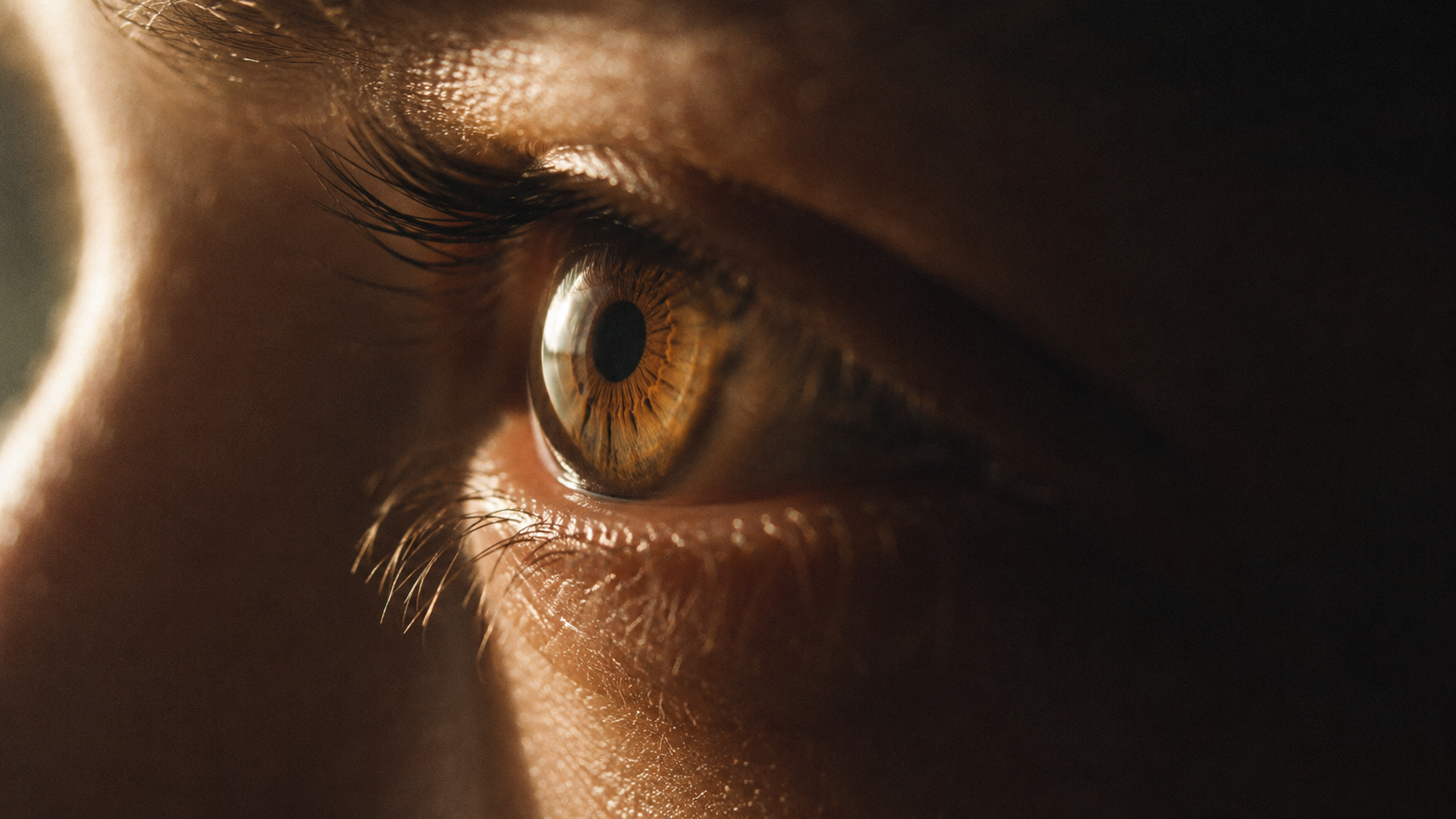
ECU and macro prompts crafted by a VFX artist — eyes, micro-expressions, hands and texture detail. Paste into Kling AI, Runway or Sora.
30
Prompts
5
Categories
100%
Free
#001 · Eyes
Extreme close-up, 100mm macro lens, static frame. A woman's eye in sharp focus, warm window light from the left catching the iris — amber flecks visible, a moisture line along the lower lid. One slow blink. Shallow depth of field, brow and cheek dissolving into soft blur. Visible skin texture, fine pores, no digital smoothing. Kodak 500T grain, 2.39:1.
✦ Why this works
Single micro-action (one blink) keeps AI motion clean
Iris detail language forces macro-level rendering
Anti-smoothing instruction preserves real skin texture
▶ Best for
Emotional reaction inserts
Thriller and drama tension beats
Beauty and skincare content
#002 · Eyes
Extreme close-up on a man's eyes, 85mm lens, imperceptibly slow push-in. He is reading something off-screen — his pupils track left to right in small saccades, then stop. The stop is the moment. Cool monitor light flickering faintly on the cornea, rest of the face in shadow, desaturated cold grade.
✦ Why this works
Pupil-tracking gives readable thought without dialogue
The sudden stop creates a narrative beat
Monitor flicker motivates the light source
▶ Best for
Mystery and investigation scenes
Hacker and screen-based sequences
Silent realization moments
#003 · Eyes
Macro extreme close-up of an eye opening from sleep, 100mm lens, static. Lashes part slowly, morning light blooming across the iris as the lid lifts, pupil contracting from wide to small in the brightness. Warm golden palette, soft focus falloff, gentle film grain, dreamlike but photoreal.
✦ Why this works
Waking action has a natural start and end point
Pupil contraction is a striking macro detail AI renders well
Light bloom motivates the exposure change
▶ Best for
Opening shots and title sequences
Dream and memory transitions
Morning routine content
#004 · Eyes
Extreme close-up, single tear forming at the inner corner of an eye, 100mm macro, static locked frame. The tear swells, catches warm side light, then releases and slides down — camera does not follow it. Glassy reflection of a window in the cornea. Visible fine skin texture, muted warm grade, 2.39:1.
✦ Why this works
One clear physical event — swell, release, slide
Not following the tear keeps the frame disciplined
Corneal reflection adds photoreal depth
▶ Best for
Grief and farewell scenes
Emotional climax inserts
Music video emotional beats
#005 · Eyes
Extreme close-up of narrowed eyes in warm firelight, 85mm lens, subtle handheld drift. Orange flame reflections dancing in both pupils, the brow lowering a few millimetres over the duration of the shot, crow's feet deepening. Everything outside the eye-line in black shadow. High contrast, embers of grain.
✦ Why this works
Millimetre-level brow movement reads as growing suspicion
Flame reflection gives motion inside a still face
Deep shadow isolates the emotion
▶ Best for
Villain and confrontation scenes
Campfire and interrogation moments
Western and thriller tension
#006 · Eyes
Slow rack focus extreme close-up, 100mm macro: frame opens on out-of-focus lashes, then focus resolves onto the iris where the reflection of another person is faintly visible standing in a doorway. Cold blue window light, breath-quiet stillness, desaturated grade with deep blacks.
✦ Why this works
Rack focus is a camera action AI executes reliably
Reflection-in-iris delivers story inside one frame
Stillness contrast makes the reveal land
▶ Best for
Horror and suspense reveals
Point-of-view storytelling
Plot twist moments
#007 · Eyes
Extreme close-up of an elderly eye, 100mm macro, static. Deep wrinkles radiating from the corner, a pale cataract haze at the edge of the iris, thin skin catching low golden-hour light from the left. The eye slowly closes and stays closed. Warm vintage grade, heavy organic grain, documentary realism.
✦ Why this works
Age texture gives the macro lens something honest to hold
Closing-and-staying-closed is a complete emotional arc
Documentary framing avoids AI's beauty bias
▶ Best for
Documentary and legacy pieces
End-of-life and memory scenes
Character study sequences
#008 · Expression
Extreme close-up on the lower half of a face, 85mm, static. The jaw sets, masseter muscle flexing once at the corner, lips pressing into a thin line — anger held, not released. Warm side light from the left, right side in shadow, visible stubble texture, Kodak grain, 2.39:1.
✦ Why this works
Physical anatomy (jaw, masseter) replaces the vague word angry
Suppressed emotion animates better than explosive emotion
Half-face framing focuses all resolution on the mouth
▶ Best for
Confrontation build-ups
Boardroom and standoff drama
Sports determination inserts
#009 · Expression
Extreme close-up, 100mm: the corner of a mouth fighting a smile — it twitches upward twice and is pulled back down, dimple appearing and vanishing. Soft window light, shallow focus, natural skin texture with fine vellus hair visible along the cheek, warm gentle grade.
✦ Why this works
Twitch-and-suppress is a specific repeatable micro-motion
Vellus hair keyword forces true macro realism
Fighting the smile reads as charm, not stock happiness
▶ Best for
Romance and flirtation beats
Comedy reaction inserts
Wedding film moments
#010 · Expression
Extreme close-up of a throat and jawline, 85mm, static. A hard swallow — the larynx rises and falls once, slowly. Above frame, the chin trembles almost invisibly. Cold blue evening light, sweat sheen along the neck, high contrast, tense desaturated grade.
✦ Why this works
The swallow is cinema's universal fear signal
Larynx motion is one clean mechanical action for AI
Framing below the eyes makes the audience imagine the face
▶ Best for
Fear and dread build-ups
Courtroom and verdict scenes
Horror anticipation beats
#011 · Expression
Extreme close-up on eyes and brow, 100mm, slow push-in: relief arriving — the brow unknots, held tension releasing from the forehead muscles, eyes closing for one long second, a small exhale fogging the bottom of frame in cold air. Warm light rising slightly during the shot, grain, 2.39:1.
✦ Why this works
Relief written as muscles releasing, not a label
The exhale fog gives visible breath physics
Light rising with the emotion is classic film language
▶ Best for
Good-news and reunion payoffs
Survival and rescue scenes
Sports victory inserts
#012 · Expression
Extreme close-up profile of a face listening, 85mm, static: the moment comprehension lands — eyes widen two millimetres, lips part slightly, a small intake of breath. Nothing else moves. Single hard side light carving the profile out of darkness, black background, high contrast noir grade.
✦ Why this works
Realization staged as three tiny sequential events
Profile framing plus hard light is bold and graphic
Restraint keeps AI from over-acting the face
▶ Best for
Plot reveal reactions
Noir and thriller sequences
Podcast and interview visualisations
#013 · Hands
Extreme close-up, 100mm macro, static: two hands wrapped around a hot ceramic coffee cup, steam rising through the fingers. The thumbs rub the rim slowly, once. Weathered knuckle texture, a thin silver ring, warm window light from the left, soft background bokeh, cozy warm grade.
✦ Why this works
One deliberate thumb motion keeps hands stable — AI hands fail in fast action
Steam adds constant secondary motion
Ring and knuckle texture anchor identity
▶ Best for
Café and slow-living content
Dialogue scene cutaways
Product shots for drinkware
#014 · Hands
Extreme close-up of fingers hovering over an old typewriter's keys, 85mm, static. They descend and strike one key — the typebar snaps up and hits the page. Dust motes in a shaft of warm afternoon light, brass and enamel texture, shallow focus, nostalgic amber grade with grain.
Macro extreme close-up: a hand slowly turning a page of an old book, 100mm, static. Paper fibres visible along the deckled edge, the page lifting, bending light through it, then settling. Fingertip texture and a faint paper-dust puff. Warm library light, deep shadow background, vintage grade.
✦ Why this works
Page-turn has built-in graceful arc motion
Backlit paper translucency is a beautiful macro effect
Slow speed hides any finger artifacts
▶ Best for
Book and education content
Historical documentary beats
Calm ASMR-style sequences
#016 · Hands
Extreme close-up, 100mm macro, subtle handheld: trembling fingers trying to push a key into a lock in the dark. The key misses the slot once, scrapes, then seats. Cold streetlight from above, breath fog drifting through frame, high contrast, cyan-leaning night grade.
✦ Why this works
Miss-then-seat is tension told in two beats
Trembling is prompted as motion, not emotion
Scrape and seat give implied sound design
▶ Best for
Thriller and home-invasion tension
Escape sequences
Nervous character moments
#017 · Hands
Extreme close-up of hands lacing a boot, 85mm, static low angle. Fingers pull the laces tight in one strong motion, leather flexing, dust shaking loose. Morning light raking across scuffed leather texture, shallow depth, gritty warm grade, 2.39:1.
✦ Why this works
Lace-pull is a single power gesture — reads as resolve
Extreme close-up: an open palm slowly closing into a fist, 100mm, static, centred frame. Tendons rising under the skin, knuckles whitening at full grip, a faint tremor at maximum tension. Single hard top light, black background, monochrome high-contrast grade.
✦ Why this works
Open-to-fist is the cleanest strength arc for AI hands
Tendon and knuckle language forces anatomical detail
Black-background isolation removes failure points
▶ Best for
Determination and resolve beats
Fitness and combat content
Title card backgrounds
#019 · Tension
Extreme close-up of an analogue clock's second hand, 100mm macro, static. The hand ticks four times — each tick a sharp mechanical jump, the minute hand trembling microscopically with each impact. Brushed metal texture, cold overhead light, deep shadow, desaturated thriller grade.
✦ Why this works
Ticking is rhythmic motion AI sustains perfectly
Micro-trembles on impact add mechanical realism
Universal deadline symbolism needs no context
▶ Best for
Countdown and deadline sequences
Exam and heist tension
Opening credits
#020 · Tension
Extreme close-up, static 100mm: a phone screen face-down on a wooden table. It vibrates once — buzzing against the wood, screen glow flaring around its edges, then falling dark. Dust ring around the phone, warm lamp light, shallow focus, quiet dread in a muted grade.
✦ Why this works
One buzz is a complete micro-event with light change
Edge-glow flare tells the story without showing the screen
Macro extreme close-up of a fuse burning, 100mm, slow lateral tracking following the spark. The flame point crackles along the cord, throwing tiny sparks, blackened cord curling behind it, smoke ribboning upward. Dark background, the spark as the only light source, orange-on-black grade.
✦ Why this works
Travelling spark motivates the only camera move on this list
Self-illuminating subject solves AI lighting consistency
Burnt-cord trail shows elapsed time in one frame
▶ Best for
Action countdowns
Heist and demolition scenes
Explosive reveal lead-ins
#022 · Tension
Extreme close-up of a door handle, 85mm, static, slightly low angle. The handle begins to turn — slowly, in silence — reaches its limit, then returns. A shadow shifts in the light gap beneath the door. Cold hallway light, high contrast, horror-leaning desaturated grade with heavy grain.
✦ Why this works
Turn-and-return is a two-beat scare with no payoff shown
Shadow in the door gap implies presence economically
Static frame makes the audience lean in
▶ Best for
Horror and home-alone scenes
Suspense trailers
Unseen-threat storytelling
#023 · Tension
Extreme close-up, 100mm macro, static: a chess piece — the black king — being tipped over by a single finger. It rocks once on its base and falls in slow motion, landing with a soft thud beside the board's edge. Window light from the left, dust motes, shallow focus, cold contemplative grade.
✦ Why this works
The rock-before-fall doubles the drama of one action
Slow-motion request works well on a single object
Surrender symbolism carries an entire scene
▶ Best for
Defeat and resignation beats
Business and strategy content
Ending sequences
#024 · Tension
Extreme close-up of a wax seal being pressed onto an envelope, 100mm macro, static overhead. The brass stamp descends into molten red wax — wax squeezing outward in a slow bloom, the crest emerging as the stamp lifts. Candlelight flicker, parchment texture, rich warm period grade.
✦ Why this works
Press-bloom-lift is a satisfying three-phase motion
Molten wax physics render beautifully in macro
Overhead angle keeps geometry simple for AI
▶ Best for
Period drama and fantasy inserts
Wedding and invitation content
Luxury brand storytelling
#025 · Texture
Extreme macro close-up of rain hitting skin on a forearm, 100mm, static. Individual droplets striking, splashing micro-crowns, then merging into runnels that follow the arm hair. Cold grey daylight, goosebumps rising across the shot, visible pore and hair detail, desaturated blue grade.
✦ Why this works
Droplet impact crowns are a spectacular macro physics moment
Goosebumps rising gives the shot a living arc
Runnel paths create natural motion lines
▶ Best for
Weather and mood montages
Endurance and sports content
Emotional rain scenes
#026 · Texture
Extreme close-up of condensation on a cold glass bottle, 100mm macro, static. One droplet swells, breaks free, and carves a clear track down through the mist of smaller droplets, distorting the warm bar lights behind the glass. Amber backlight, shallow focus, commercial-clean grade.
✦ Why this works
The single racing droplet is the classic beverage-ad hero shot
Light distortion through the track adds premium realism
Backlit condensation is high detail with low failure risk
▶ Best for
Beverage and product commercials
Bar and restaurant content
Summer campaign visuals
#027 · Texture
Macro extreme close-up of a match strike, 100mm, static: the head drags across the striker in slow motion — friction sparks, a chemical flare of white, then the flame settling to a teardrop. Smoke curling into the black background, the flame as sole light source painting the fingertips orange.
✦ Why this works
Strike-flare-settle is a perfect three-act micro story
Self-lit subject guarantees lighting consistency
Slow motion flatters the chemical flare
▶ Best for
Scene transitions and openers
Music video beats
Fire and danger foreshadowing
#028 · Texture
Extreme close-up of fabric tearing, 100mm macro, static: hands out of frame pull denim apart — individual threads stretching white, snapping one by one, the tear travelling three centimetres before the shot ends. Fibre dust puffing in hard side light, high detail, gritty desaturated grade.
✦ Why this works
Thread-by-thread snapping is granular motion AI handles well
Limiting the tear length keeps the action controlled
Fibre dust in side light adds free production value
▶ Best for
Action and struggle inserts
Fashion deconstruction content
Metaphor shots for breaking points
#029 · Texture
Extreme macro of ice cracking in a glass of amber whisky, 100mm, static overhead. A hairline fracture spiders through the cube with an implied snap, tiny bubbles rising as the ice shifts and settles against the glass. Warm low light through the liquid, caustic patterns on the table, luxurious golden grade.
✦ Why this works
Crack propagation is a crisp instantaneous event
Caustic light patterns add photoreal richness
Overhead framing simplifies the geometry
▶ Best for
Luxury beverage content
Quiet character moments
Bar scene cutaways
#030 · Texture
Extreme close-up of charcoal sketching on rough paper, 100mm macro, slow tracking with the stroke. The charcoal edge crumbles slightly as it drags, leaving a grainy line, paper tooth catching pigment, fine black dust settling. Soft north-window light, artist's finger smudged at frame edge, warm neutral grade.
✦ Why this works
Following the stroke motivates a clean tracking move
Crumbling edge and dust are honest macro details
Paper tooth texture rewards the 100mm lens
▶ Best for
Artist and process content
Title and credit sequences
Education and tutorial openers
About These Extreme Close-Up Prompts
The extreme close-up is the most intimate shot in cinema — a single eye, a hand tightening, a key entering a lock. Directors cut to an ECU when a detail carries more story than a whole room. It is also the shot type where AI video performs at its best: with all of the model’s resolution spent on one small region, a trembling lip or a droplet of condensation renders with a realism that wide shots can never reach.
But ECUs fail for a specific reason when prompted casually: AI models over-smooth. Ask for "a close-up of a face" and you get plastic skin and dead eyes. Every prompt in this collection fights that with explicit texture language — visible pores, fine vellus hair, thread-by-thread detail — plus a macro lens specification (85–100mm) and exactly one micro-action per shot, because a single clean movement is what keeps extreme close-ups from warping.
These 30 prompts cover the five jobs an ECU does in a real edit: eyes, micro-expressions, hands, tension-building object inserts, and pure texture. Use them as cutaways inside a larger scene, or as standalone shots — every one specifies lens, movement, lighting direction and grade.
How to Use These Prompts
1
Copy any prompt
Browse the collection and find a prompt that matches the type of shot you need. Click the Copy button to copy the full prompt to your clipboard.
2
Open your AI video tool
Open Kling AI, Runway, Sora, or any other AI video generator you use. Navigate to the text prompt input field.
3
Paste and adjust
Paste the prompt into the input field. You can use it exactly as written, or replace the generic scene description with your specific subject — for example, replace "a lone warrior" with "a detective in a rainy alley".
4
Generate and review
Generate the video clip. If the result does not match what you expected, try adjusting the lighting description or camera movement in the prompt and generate again.
Tips for Best Results
✦
One micro-action per shot — "a single slow blink" holds together; "she blinks, smiles and looks away" will warp. Save the second action for the next generation.
✦
Fight the smoothing: add "visible skin texture, fine pores, no digital smoothing" to any face ECU. Without it, AI models default to plastic beauty-filter skin.
✦
Use 85–100mm macro lens language and name the shallow focus — "brow and cheek dissolving into soft blur" tells the model exactly where detail should live and where it should melt.
✦
Describe emotions as muscle movements, not labels — see the expression table below. "Jaw sets, masseter flexes" performs; "angry face" doesn’t.
Writing Expressions AI Can Actually Perform
Emotion labels like "sad face" or "angry expression" produce generic, often uncanny results — the model has no idea which muscles you mean. The fix is the same direction real actors are given: describe the physical behaviour, not the feeling. In an extreme close-up the model spends all of its resolution on one region of the face, so a trembling lip or a two-millimetre brow movement renders better here than in any other shot type.
Emotion
✗ Don't write
✓ Write instead
Grief
a sad expression
eyes glassy with unshed tears, lower lip pressed tight, one slow blink
Fear
a scared face
a hard swallow, larynx rising and falling, chin trembling almost invisibly
Suppressed anger
looking angry
jaw setting, masseter flexing once, lips pressing into a thin line
Relief
a relieved smile
the brow unknotting, eyes closing for one long second, a small exhale
Suspicion
a suspicious look
eyes narrowing a few millimetres, brow lowering slowly, gaze holding still
Frequently Asked Questions
What is an extreme close-up (ECU) shot?
An extreme close-up frames a single small detail — an eye, a mouth, a hand, an object — so it fills the entire frame. In film grammar it is used for maximum emotional intensity or to make the audience notice a story-critical detail. In prompts, it is signalled with "extreme close-up" plus a long macro lens such as 100mm.
Why do AI extreme close-ups often look plastic or fake?
Because most AI video models are trained toward flattering, smoothed results. At ECU distance that smoothing becomes obvious — skin turns to wax. The fix is explicit anti-smoothing language in the prompt: visible pores, fine vellus hair, natural skin texture, film grain. Every face prompt in this collection includes it.
Can these ECU prompts show emotions and expressions?
Yes — but only if the emotion is written as physical behaviour rather than a label. "Sad expression" produces generic results; "eyes glassy with unshed tears, lower lip pressed tight" gives the model concrete muscle geometry to render. The Micro-Expressions category and the table on this page are built entirely around that principle.
How do I use these inside a full scene with other shot types?
ECUs work best as inserts inside a wider sequence — a scene plays in wide and medium shots, then cuts to an extreme close-up at the emotional peak. Our free AI Scene Builder includes an Insert Shot type and keeps lighting and characters consistent between your wide shots and these close-ups.
Build ECUs into a full consistent scene
Scene Builder generates matched wide shots, close-ups and inserts with locked characters and lighting.